Cydia | Jailbreak iPhone, iPod Touch, iPad - Part 17 Skip to content

Jailbreak iPhone, iPod Touch, iPad

новости про джейлбрейк iPhone, iPod Touch и iPad

Archive

Tag: Cydia

Redmondpie have completed the HTC Hero theme for iPhone. They have done a really good job because it looks good:

It works on jailbreaked iPhones via Winterboard. Here is a link to step-by-step installation instructions. I guess this theme will appear in Cydia quite soon, so installation would be much easier.

Here is a video that shows this HTC Hero theme on iPhone:


Read the rest of this entry »

gv_mobile

Yesterday Apple blocked an official Google Voice app from the App Store; meanwhile, they also kicked out unofficial versions, f.e. GV Mobile. But you can still get GV Mobile for free… via Cydia.

The developer of GV Mobile has decided to go ahead and release GV Mobile for free rather than let his work go to waste. You have to jailbreak iPhone to get this app.

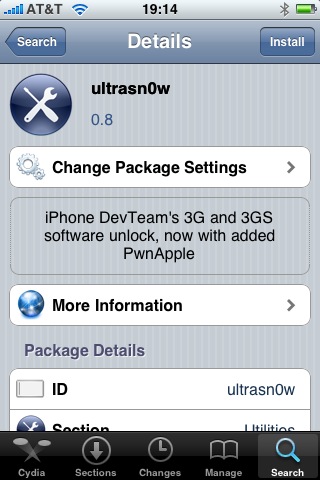
ultrasn0w-0-8

Great news for all iPhone 3GS users. DevTeam updated ultrasn0w, software that unlocks iPhone with firmware 3.0. Now it supports iPhone 3GS!

Avaliable in Cydia, repo: repo666.ultrasn0w.com

Here are quick instructions:

  1. Ensure you have firmware 3.0
  2. Jailbreak your iPhone using redsn0w (this will also install Cydia)
  3. Run Cydia
  4. Please add the repo repo666.ultrasn0w.com to Cydia. That last “o” is actually the number zero “0”! If you use the letter “o” you’ll get an error.
  5. Search for ‘ultrasn0w’ in cydia or icy and install ultrasn0w
  6. Reboot your iPhone 3G
  7. T-Mobile USA users should disable 3G before using ultrasn0w
  8. Enjoy
  9. If you have any problems reset your network settings (it helped many users): Settings->General->Reset->Reset Network Settings

unlock

DevTeam released Ultrasn0w – application that will unlock your iPhone 3G with firmware 3.0. Here are the instructions:

  1. Ensure you have upgraded to iPhone OS 3.0
  2. Jailbreak your iPhone using redsn0w (this will also install Cydia)
  3. Run Cydia
  4. Please add the repo repo666.ultrasn0w.com to Cydia. That last “o” is actually the number zero “0”! If you use the letter “o” you’ll get an error.
  5. Search for ‘ultrasn0w’ in cydia or icy and install ultrasn0w
  6. Reboot your iPhone 3G
  7. T-Mobile USA users should disable 3G before using ultrasn0w
  8. Enjoy

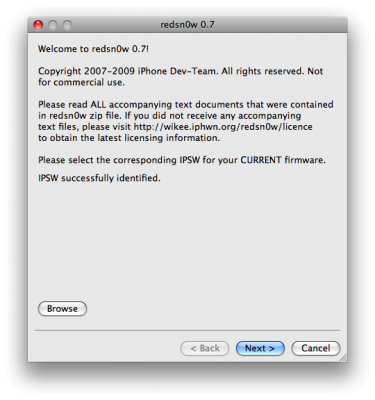
redsn0w

RedSn0w is an easy to use, multi-platform, multi-device jailbreaking and unlocking (iPhone 2G only) tool from DevTeam. It supports firmware 3.0 and iPhone 2G (original iPhone), the iPhone 3G (but not the 3GS) and also the iPod touch (first and second generation):

  • iPhone 2G – jailbreak and unlock
  • iPhone 3G – only jailbreak, use only with official unlocked iPhones (UPDATE: unlock is avaliable)
  • iPod Touch – jailbreak
  • iPod Touch 2G – jailbreak
  • iPod Touch 3GS – not supported (UPDATE: is supported by version 0.8)

Currently it is available for Windows and Mac OS X. The tool works just like QuickPwn. If you want to build custom firmware files with more flexibility it is suggested that you use PwnageTool on Mac OS X.

  1. GOLDEN RULE: If you are using a 3G iPhone with yellowsn0w and rely on yellowsn0w to obtain cellular service, then you should NOT use redsn0w right now. Ultrasn0w (the 3G carrier unlock) is not included with this release and therefore your baseband will be locked and unable to use an operator other than the official one it was bought for. UltraSn0w will be released via APT (cydia and icy) soon. If you have an original iPhone (1st generation) then 3.0 carrier unlock works with this redsn0w release.
  2. Yellowsn0w in its current form will NOT work with the baseband version that is present in the 3.0 update, you will need Ultrasn0w, which will be released sometime soon (update: released), Ultrasn0w will work with all iPhone 3G models (but not 3GS), even ones that were previously unlockable, Ultrasn0w will be released via APT (this means you will be able to get it via Cydia or Icy).
  3. Please read all parts of this post before downloading and using these tools.
  4. Read items 1, 2 and 3 again and again.
  5. At the bottom of this post are the bittorrent files for the latest version of redsn0w.
  6. This app is suitable for the recent 3.0 release
  7. redsn0w will NOT work for the iPhone 3GS.
  8. redsn0w WILL work for Original iPhone (1st Generation), Original iPod touch, iPod touch 2G and the iPhone 3G (not the iPhone 3GS).

To use redsn0w simply upgrade the device in iTunes to firmware version 3.0 and run redsn0w to activate and jailbreak the device (and if you are using an original iPhone 2G, it will unlock it too!)

You can donwload RedSn0w 0.7 here.

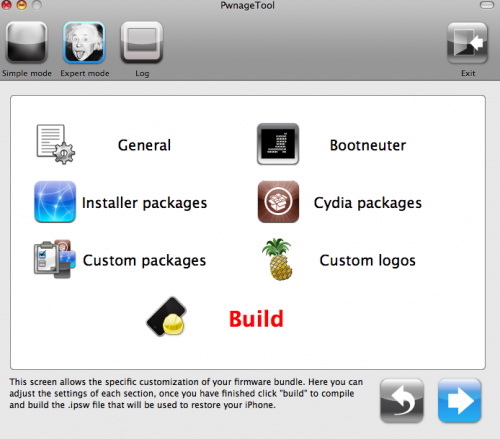
pwnage 20

DevTeam released PwnageTool for firmware 3.0. Here is the list of supported deviced:

  • iPhone 2G – jailbreak and unlock
  • iPhone 3G – only jailbreak, use only with official unlocked iPhones
  • iPod Touch – jailbreak
  • iPod Touch 2G – not supported, use redsn0w
  • iPod Touch 3GS – not supported

If you are using a 3G iPhone with yellowsn0w and rely on yellowsn0w to obtain cellular service, then you should NOT use PwnageTool right now. Ultrasn0w is not included with this release and therefore your baseband will be locked and unable to use an operator other than the official one it was bought for. Ultrasn0w will be release via APT (cydia and icy) soon (update: Ultrasn0w released). If you have an original iPhone (1st generation) then 3.0 unlock works with this PwnageTool release.

Yellowsn0w in its current form will NOT work with the baseband version that is present in the 3.0 update, you will need Ultrasn0w, which will be released sometime soon, Ultrasn0w will work with all iPhone 3G models (but not 3GS), even ones that were previously unlockable, Ultrasn0w will be released via APT (this means you can get it via Cydia or Icy).

PwnageTool will NOT work for the iPhone 3GS. PwnageTool WILL work for Original iPhone (1st Generation), Original iPod touch (1st Generation) and the iPhone 3G.

You can donwload PwnageTool 3.0 here.

AppStore and iTunes are great. But when we want other useful apps we jailbreak and run Cydia. Some use Installer, others prefer Icy. Here is a demonstration of new app to install 3-rd party apps called Kryptes:

ants1

Once again we have the ability to have ants running on our iPhone. This little toy was available on firmware 1.1.x. Now the developer has update the code to support firmware 2.x. If you don’t remember ants take a look at the video below. This toy is easy to use. As you might remember you open the app and activate the ants. Then open your notes and watch the ants fill the screen. You can smash them or shake your iPhone to remove them. Ants is available in Cydia for jailbreaked iPhones.

jailbreak_skype

If you have jailbreaked iPhone your Skype app may crash. Here is what we know so far:

  • If Skype crashes when trying to input text: Disable both Clippy (Use SBSettings toggle) and any custom Winterboard sounds relating to the keyboard tick (tock.aiff).
  • If Skype crashes within 1 minute of having the app open: Update app called mobile substrate in Cydia. Uninstalling mobile substrate also fixes the problem, but you will lose features such as winterboard and sbsettings.

UPDATE: Many users report that Skype works fine with the latest version of Clippy (0.98-2) without the need to turn the latter off.

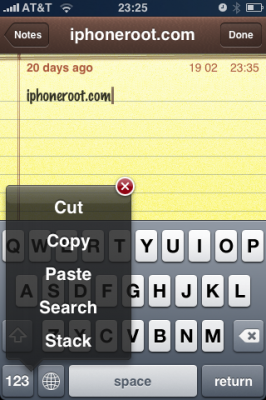
Clippy is an iPhone addition for copy/paste functionality. It was updated to version 0.98. There are significant improvements that make the application much more stable, and moreover it is important to note that starting from now, Clippit becomes a completely free.

Avaliable via Cydia and Icy for jailbreaked iPhones.

Changelog for 0.98: March 29, 2009:


Read the rest of this entry »