Cydia | Jailbreak iPhone, iPod Touch, iPad - Part 15 Skip to content

Jailbreak iPhone, iPod Touch, iPad

новости про джейлбрейк iPhone, iPod Touch и iPad

Archive

Tag: Cydia

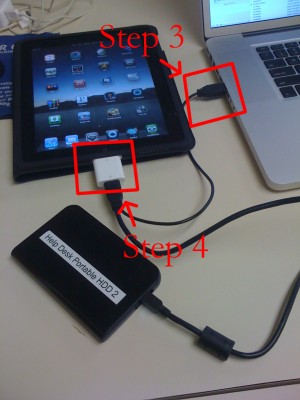
iPad USB Camera Connection Kit is much more useful as it seems. Max Sha, an experienced user, was able to access external hard drive with this kit. All you need is a jailbroken iPad, an external drive, a split-USB cable to give the drive some power and a terminal of some sort (f.e. MacBook) to mount the external storage. While it is a little unwieldy, it shows that Terabytes of external storage for iPad is possible.

Here is a complete step-by-step guide from Max Sha:

Read the rest of this entry »

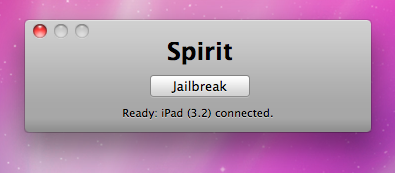
spirit_jailbreak

Finally the jailbreak for iPad, iPhone and iPod Touch from the Dev Team is available for download. It’s free and untethered and it’s called “Spirit”. The jailbreak supports every iDevice with firmware version 3.1.2, 3.1.3 or 3.2.


Read the rest of this entry »

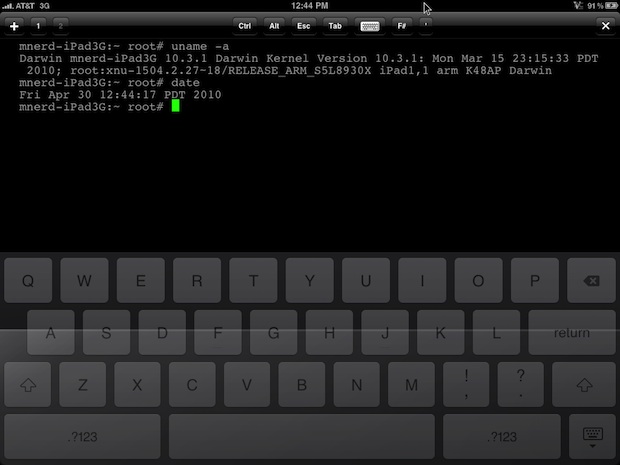
iPad Console

Wow! Hours after iPad 3G sales launch and it has already been jailbroken! Below is a video of MuscleNerd where jailbroken iPad 3G runs Cydia.

MuscleNerd used the jailbreak called “Spirit”. It’s a tool that makes untethered unlock of iPad, iPod Touch 3G and iPhone 3GS and DevTeam promises it will be available soon. Stay tuned for further instructions how to save your SHSH Blobs and then use Spirit to jailbreak your device.


Read the rest of this entry »

A few hours ago iH8sn0w posted a tweet that he is able to run jailbreak on the new firmware 4.0 beta 1. DarkMalloc, another developer who worked on the project, has just released new video that shows firmware 4.0 jailbreak on iPhone 3G:

The interesting thing, besides the presence of Cydia and MobileTerminal, is the possibility to have multiple applications open at once. That means that multitasking on iPhone 3G can be enabled. Officially Apple doesn’t want to activate this functionality on iPhone 3G, just iPhone 3GS and later devices.

cydia_on_ipad ipad_verbose

Geohot has recently announced he updated his BlackRa1n jailbreak and now it supports the iPad. There is still no information about the release date, but his images above show that BlackRa1n and Cydia have been installed successfully and that the iPad can be booted in a verbose mode.

This is good news for for those who use Cydia, an alternative to Apple’s AppStore for jailbreaked iPhones and iPod Touches. Saurik has uploaded a new version of APT that has an optimized cache generator and greatly improves Cydia performance:

“I also uploaded a new version of APT I’ve been working on: it has an optimized cache generator and more error tolerant repository parsing.”

When launching Cydia the next time you will find updates for some APT packages (up to 3 depending on what you have installed). Perform the install and enjoy the speed improvements!

Fuzzyband is an application that can downgrade the baseband for iPhone 3G. Recently it has been updated to include the support for firmware 3.1.3 baseband 05.12.01. It works only with bootloader 05.08 (early iPhone 3G).

Why do users need to downgrade the baseband? The answer is simple: if they accidentally upgraded the new firmware and need to run unlock software (blacksn0w and ultrasn0w). Unlocked iPhones do not need Fuzzyband. iPhone 3GS users cannot downgrade baseband with Fuzzyband.

Fuzzyband is available for jailbreaked iPhones in Cydia (repository BigBoss, category “System” ).

fuzzyband-1 fuzzyband-2 fuzzyband-3

redsn0w-092

Redsn0w is a cross-platform jailbreaking tool for iPhone and iPod Touch. New version redsn0w 0.9.2 supports the latest firmware 3.1.2.

redsn0w 0.9.2 supports:

  • All iPhones and iPod touches
  • Windows and Mac OSX (x86)
  • Apple firmwares 3.0 and 3.1.2

We expect to see Linux version quite soon.

If you need a carrier unlock, redsn0w will handle iPhone 2G by itself (by installing the BootNeuter utility). For the iPhone 3G and iPhone 3GS use Cydia after you’re jailbroken to install ultrasn0w (baseband 04.26) or blacksn0w (baseband 05.11).

If you have a late-model iPhone 3GS, or if you have an iPod touch 2G whose serial number begins with “MC” (newer than week 40 of last year), or any iPod touch 3G, you can use redsn0w to jailbreak but you are currently restricted to “tethered” rebooting. That means you need to connect your device to a computer each time you boot it – so just try no to reboot.

You can download the latest version of redsn0w here.

redsn0w-09b3

Redsn0w is a cross-platform jailbreaking, unlocking, and customizing tool for iPhone and iPod Touch. New version redsn0w 0.9b3 supports the latest firmware 3.1.2. The most recent release before this one was redsn0w 0.8, which targeted Apple firmware 3.0/3.0.1.

redsn0w 0.9 beta3 supports:

  • All iPhones and iPod touches except the iPod touch 3G
  • Windows and Mac OSX (x86)
  • Apple firmwares 3.0-3.1.2

When it’s out of beta, it will support the iPod touch 3G, PPC OSX, and Linux.

If you need a carrier unlock, redsn0w will handle iPhone 2G by itself (by installing the BootNeuter utility). For the iPhone 3G and iPhone 3GS use Cydia after you’re jailbroken to install ultrasn0w (baseband 04.26) or blacksn0w (baseband 05.11).

If you have a late-model iPhone 3GS, or if you have an iPod touch 2G whose serial number begins with “MC” (newer than week 40 of last year), you can use redsn0w to jailbreak but you are currently restricted to “tethered” rebooting. That means you need to connect your device to a computer each time you boot it – so just try no to reboot.

You can download redsn0w 0.9b3 here.

sn0wbreeze

iH8Sn0w has released a beta of Sn0wbreeze a software utility which jailbreaks the iPod Touch 1G, 2G and iPhone 2G, 3G, and 3GS (old bootrom & non MC). The software runs on Windows XP, Vista, 7 (32 or 64 bit). Sn0wbreeze is similar to PwnageTool for Mac. It will allow you to create custom ipsws which can be built to include Cydia applications and personalized boot logos.

At this time BlackRa1n is still recommended for Windows users with firmware 3.1.2 and RedSn0w for earlier firmwares.