Apple seems really dislike everything that helps users to jailbreak their devices. This time Apple blocked access to the Cydia website via Wi-Fi network in Apple retail stores. If you try accessing Cydia on a device connected to one of Apple’s Wi-Fi hotspots, you’ll be surprised to see Apple’s website load instead. As far as we remember, last year federal regulators said that it was no longer illegal to hack or jailbreak an iPhone. However, Apple doesn’t care about that and continues its “war” with jailbroken devices.
Archive
Tag: CydiaIt seems that the recently released iPad 2 has been jailbroken. iOS hacker, known as Comex, posted on his Twitter account that the iPad 2 jailbreak is underway. The Jailbreak has yet to be packaged. Comex has yet to say when the jailbreak will made public, and how it works, but we now at least know the iPad 2 is able to be jailbroken. On the shot above you may see the proof – the jailbroken white iPad 2 3G with Cydia ready to launch.

Apple will soon disable restoring to iOS 4.2.1 for iPad and iPhone. In order to preserve jailbreak and unlock save your SHSH keys now! 4.3b keys might also help you in future untethered jailbreak.
You can do that using TinyUmbrella utility. Download it for Mac or Windows . Just run it and push “Save ALL SHSHs” button.
The other way is to save SHSHs via Cydia. Run Cydia and make sure the keys are saved (green line on the top).
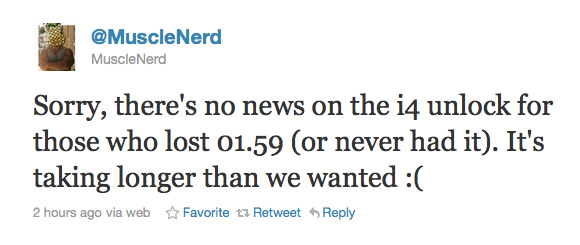
MuscleNerd recently tweeted some news regarding unlock. Unfortunately:
Sorry, there’s no news on the i4 unlock for those who lost 01.59 (or never had it). It’s taking longer than we wanted 🙁
This means that users have to wait more. No due date was given. If you need unlock just remember to save your SHSH keys using Cydia or TinyUmbrella and do NOT update to iOS 4.3.
This news are for users with locked iPhone 4 with baseband 02.10 or 03.10, iPhone 3G/3GS with baseband 05.14 or 05.15. For 05.14 and 05.15 there is a possibility to update to 06.15 and unlock, but there are special risks.
Step-by-step Tutorial: jailbreak iOS 4.2.1 on iPhone/iPod/iPad using PwnageTool 4.2 (Mac OS)
Mar 9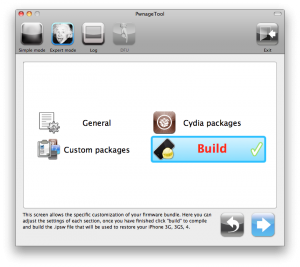
UPDate: !
UPDate 2: Attention! We’ve received info, that Apple stopped signing iOS 4.2 for devices for which iOS 4.3 is available. This means you will not be able to restore to 4.2.1 without saved SHSH keys.
Using this tutorial you will be able to jailbreak iOS 4.2.1 running on iPhone 3G, iPhone 3GS, , iPod Touch 3G, iPod Touch 4G and iPad. Pwnagetool will also preserve baseband version if you need carrier unlock. If you have updated the baseband to version 06.15, you can use this tutorial. This tutorial uses PwnageTool 4.2 for Mac OS X.
We are not developers of jailbreak utilities, so we cannot assure that everything will work just fine. However we tried this tutorial on several devices and succeeded.
We will use iPhone 4 in our jailbreak tutorial. The process is the same for all devices.
Step One
Make a folder called “Pwnage” on the desktop. Download a couple of things:
DevTeam released PwnageTool 4.2 utility. It is able to create a custom IPSW that can perform an untethered jailbreak on iOS 4.2.1. As usual it can preserve baseband version for unlockers. Devteam used the same method that was implemented in greenpois0n.
PwnageTool supports all 4.2.1 devices other than iPod touch 2G:
- iPhone3G
- iPhone3GS
- iPhone4-Verizon
- iPod touch 3G
- iPod touch 4G
- iPad
- AppleTV 2G
Jailbreak is even improved compared to GreenPois0n RC6:
DevTeam released PwnageTool 4.2 utility. It is able to create a custom IPSW that can perform an untethered jailbreak on iOS 4.2.1. As usual it can preserve baseband version for unlockers. Devteam used the same method that was implemented in greenpois0n.
PwnageTool supports all 4.2.1 devices other than iPod touch 2G:
- iPhone3G
- iPhone3GS
- iPhone4-Verizon
- iPod touch 3G
- iPod touch 4G
- iPad
- AppleTV 2G
Jailbreak is even improved compared to GreenPois0n RC6:

Developer Steve Troughton-Smith has tweeted that customers of Three in Ireland and the UK and China Unicom in China woke up today and found that that Cydia on their devices was blocked by the carrier. So, now the jailbroken devices don’t have access to certain content from Cydia when on the Three and China Unicom networks. Though, only main page is unavailable. Moreover, Cydia is blocked over 3G networks that means that the popular store still available via Wi-Fi.
These are step-by-step instructions on how to jailbreak iOS 4.2.1 on iPhone 3GS, , iPad, iPod Touch 2G, iPod Touch 3G, iPod Touch 4G using Greenpois0n for Windows. Tutorial for Mac OS X users is available . All the steps are the same for all devices, we will cover iPhone.
Greenpois0n has been updated to support the iOS 4.1 and iOS 4.2.1 firmware. Use Limera1n if you want to jailbreak iOS 4.0, iOS 4.0.1, iOS 4.0.2.
Remember: Greenpois0n recommends a clean restore before continuing.
Unlockers: do not update to iOS 4.1 or iOS 4.2.1 if you need the unlock. Ultrasn0w does not support that baseband yet. The only exception is the iPhone 4. Experienced users can also try update to iOS 4.2.1 without upgrading your baseband by using TinyUmbrella. Start TSS Server->Start iTunes->Plug in your iPhone->Restore 4.2.1->Error 1013->Put phone into DFU Mode->Launch Greenpois0n.
We are not authors of this app. We do not promise that everything will go well, use this tutorial at your own risk.
Step One
Open your web browser and download the latest Windows version of GreenPois0n from .
Step-by-step tutorial: Jailbreak iOS 4.2.1 on iPhone, iPod or iPad using Greenpois0n for Mac OS
Feb 4
These are step-by-step instructions on how to jailbreak iOS 4.2.1 on iPhone 3GS, , iPad, iPod Touch 2G, iPod Touch 3G, iPod Touch 4G using Greenpois0n for Mac OS X. Tutorial for Windows users is available . All the steps are the same for all devices.
Greenpois0n has been updated to support the iOS 4.1 and iOS 4.2.1 firmware. Use Limera1n if you want to jailbreak iOS 4.0, iOS 4.0.1, iOS 4.0.2.
Remember: Greenpois0n recommends a clean restore before continuing.
Unlockers: do not update to iOS 4.1 or iOS 4.2.1 if you need the unlock. Ultrasn0w does not support that baseband yet. The only exception is the iPhone 4. You can unlock iPhone 4 with iOS 4.1 using ultrasn0w. Experienced users can also try update to iOS 4.2.1 without upgrading your baseband by using TinyUmbrella. Start TSS Server->Start iTunes->Plug in your iPhone->Restore 4.2.1->Error 1013->Put phone into DFU Mode->Launch Greenpois0n.
We are not authors of this app. We do not promise that everything will go well, use this tutorial at your own risk.