Free | Jailbreak iPhone, iPod Touch, iPad - Part 5 Skip to content

Jailbreak iPhone, iPod Touch, iPad

новости про джейлбрейк iPhone, iPod Touch и iPad

Archive

Tag: Free

iphonepaper

Wallpaper Labeler (AppStore link) and gCalWall Lite (AppStore link) let you add appointments and notes to the home screen. With Wallpaper Labeler, you can enter any text you want to your wallpaper, so you can leave yourself (or whoever finds your phone) notes. The other app, gCalWall, pulls down upcoming appointments from your default Google Calendar and splays them all over your home screen. You have to update it manually, which is kind of a drag, but the dev says that iPhone API won’t allow for automatic updating. Both apps are free 🙂

In the past you could only use Intelliscreen paid app on a jailbreaked iPhone.

via gizmodo, lifehacker

isutra1

iSutra, this nice application. Thanks to jailbreaking and Cydia we can run and use. It updated to vesrion 1.1. Just in time for Valentines Day. Several bugs fixed. It is also translated into Russiand and Portugese. If you’re not familiar, watch the video here.

emojifun

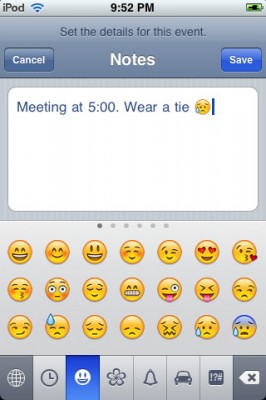
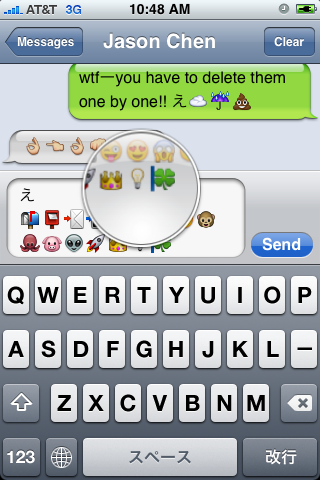
Emoji, emoticons and pictorial characters popular in the Japanese instant messaging culture, were introduced to Japanese customers as part of the iPhone 2.2 Firmware update, but have required workarounds to be enabled for non-Japanese users. There are many solutins to turn Emiji Icons (Get Emoji Icons for free), but the easy one required jailbreaking. Recently Apple approved an application that simplifies this process. App is called EmotiFun and it is free (AppStore link).

Everything is simple: get app, run it, exit and go to Settings -> General -> Keyboard -> International Keyboards -> Japanese and enable.

emmoji

Apple rejected iPhone application called iSutra. So it is avaliable via Cydia for jailbreaked iPhones for FREE.

First of all these icons can be viewed on any iPhone with 2.2 firmware. But to be able to send these icons users need to perform additional actions. There are 4 ways to turn them on and 2 of them are free:

Solution N1 for $5.99:

In AppStore buy and install Touch Dial Emoji. Goto Settings -> Touch Dial -> Enable Smiley icon ON. Launch Touch Dial. Go to Settings -> General -> Keyboard -> International Keyboards -> Japanese and enable “Emoji.”

Solution N2 for $0.99:

In AppStore buy and install FrostyPlace. Play with the app for a minute to activate, click on a story, etc. Go to Settings -> General -> Keyboard -> International Keyboards -> Japanese and enable “Emoji.”

Solution N3 for Free:

Jailbreak your iPhone. Run Cydia and install Emoji application (iSpazio repository). Go to Settings -> General -> Keyboard -> International Keyboards -> Japanese and enable “Emoji.”

This application adds boolean ‘true’ key KeyboardEmojiEverywhere edits in /User/Library/Preferences/com.apple.Preferences.plist. You can do it manually if you want.

Solution N3 for Free:

Step 1. Download the vcard.vcf here.
Step 2. Import it to your address book program. If you are using Windows, you may want to do it on iPhone directly. Send the vcard.vcf file to yourself. Open in on iPhone’s Email.app, click the vcf file and import all the contacts.
Step 3. Go into “Settings” > “General” > “Keyboard” > “Japanese Keyboard”. Enable the QWERTY keyboard.
Step 4. In notes or any other program you want. Type “emojia”, “emojii” or “emojiu” to select those 🙂 icons.

I like Solution N3. It is free and simple. You do not need to play with contacts and etc. But you need to jailbreak an iPhone.

ImaSafari allows iPhone users to turn off image downloading in Safari browser. This is very useful for GRPS, EGDE and 3G connectins. First of all webpages will be downloaded faster. Second – you will save money if you pay for inernet traffic.

This utility is avaliable for free via Cydia (for jailbreaked iPhones only).

To turn images on or off just install this software and go to Settings – Safari.

via spazio

The developer, Kevin Rose, says this application will be avaliable officially via AppStore. No jailbreaking and hacking. The only concern.. will Apple approve it? I hope so. Watch the video:

PS: It will be free 🙂

Related posts:

This application is developed by Jay Freeman, the creator of the Cydia. Veency is a free app that allows iPhone owners to remotely control their iPhone from PC or Mac desktop via a VNC client.

Here are some of the features:

  • Launch applications on your iPhone
  • Reply to emails, text messages, and more
  • Rearrange icons
  • Lock/Unlock your iPhone
  • Browse through Photos and Contacts

Of course you cannot do two finger gestures with this app. All other actions can be done with the click of your mouse. The only area in which Veency fails tragically at is when opening any video recording application on the iPhone.

This application is avaliable for jailbreaked iPhones via Cydia installer.

Be sure to restart your iPhone after installing Veency and connect to the server using a Wi-Fi connection. We recommend using UltraVNC or TightVNC to connect your Windows desktop. If you’re using a Mac, we recommend Chicken VNC.

Here is a video demonstration:

via readwriteweb

This is a step-by-step tutorial. If you have iPhone 3G this guide will help you jailbreak and activate the device. For iPhone 2G it will also perform the unlock.

I recommend using 2.2 firmware, because iPhone 3G unlock is avaliable now. But you can use it with old v2.1, v2.0.1 and v2.0.2.


Read the rest of this entry »

The above message is shown at freechromethemes.com. Our guess is that Apple will never allow Chrome to make it to AppStore. However it will probably be avaliable via Cydia for jailbreaked iPhones.