Password | Jailbreak iPhone, iPod Touch, iPad - Part 2 Skip to content

Jailbreak iPhone, iPod Touch, iPad

новости про джейлбрейк iPhone, iPod Touch и iPad

Archive

Tag: password

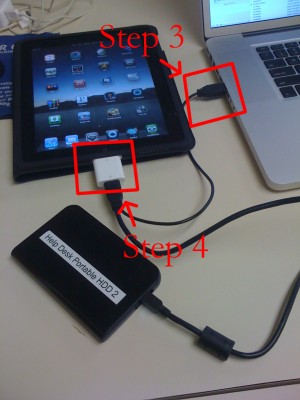
iPad USB Camera Connection Kit is much more useful as it seems. Max Sha, an experienced user, was able to access external hard drive with this kit. All you need is a jailbroken iPad, an external drive, a split-USB cable to give the drive some power and a terminal of some sort (f.e. MacBook) to mount the external storage. While it is a little unwieldy, it shows that Terabytes of external storage for iPad is possible.

Here is a complete step-by-step guide from Max Sha:


Read the rest of this entry »

apple_worm

A second iPhone worm virus has been found by security company F-Secure. It is specifically targeting people in the Netherlands who are using their iPhones for internet banking with Dutch online bank ING.

It redirects the bank’s customers to a site with a log-in screen (phishing). The worm attacks “jailbroken” phones – a modification which enables the user to run non-Apple approved software on their handset. Only handsets with installed SSH (secure shell) are at risk. SSH is a file-transfer program that enables users to remotely connect to their phones. It comes with a default password, ‘alpine’ which should be changed.

Here is a tutorial how to change the default SSH password and minimize the risk.

MobileTerminalicon

This is quite simple. If you did a jailbreak on your iPhone you need to change the default password. Why? Because hackers can access your phone, read your mail, sms, download other data. The second reason is because there are already several viruses (worms) that use these default passwords.

Here’s a quick step-by-step tutorial.

  1. If you don’t have MobileTerminal application installed: run Cydia, search for MobileTerminal and install.
  2. Run MobileTerminal.
  3. Type passwd and press return.
  4. Enter the default user password alpine and press return.
  5. Enter a new password and press return.
  6. Enter a new password again and press return.
  7. Congratulations, you changed it for default mobile user. Let’s do the same for root user.
  8. Login as root user: type su root and press return.
  9. Type passwd and press return.
  10. Enter the default root user password alpine and press return.
  11. Enter a new password and press return.
  12. Enter a new password again and press return.
  13. That’s it!

The passwords are now changed, and your jailbroken iPhone or iPod Touch is now a bit more secure than it was before and less vulnerable to the worm detected recently.

IMG_0039

Action Menu, utility that extends traditional Copy / Paste functionality, is updated to version 1.0.1.

Here is an official changelog:

  • No longer allow copying secure text fields
  • Add option to disable extended menu support
  • Support for launching Birdfeed via the Tweet action
  • Remember language in Translate service
  • Allow carriage returns in Lookup (for supported services)
  • Option to sort Favorites alphabetically
  • Translations now work (Italian, German, Japanese, French)
  • Additional Support for more apps
  • Fix for Facebook crash
  • Fix for copying song or album name in iPod app
  • Fix biteSMS-button related crashes
  • Fix crash when Lookup action is used inside SpringBoard
  • Fix Copy All breaking copy in the Photos app
  • Fix crash in iTunes password dialog
  • Fix for freeze in Fast Notes
  • Fix annoying popup on Wifi network/ringtone cells in Preferences
  • Revert 1Password to value-only copying
  • Prevent Safari freeze when invoking inside a window.prompt (temporary fix)

Action Menu can be installed or updated via Cydia on a jailbreaked iPhone (iPod Touch).

skype_icon

Skype, the iPhone and iPod Touch application through which you can call and chat with your Skype contacts, has been updated to version 1.2. There are many updates and new features.

What’s new in version 1.2:

  • Set up call forwarding from your iPhone – forward Skype calls to a phone number when you’re not signed in.
  • Improved performance and better audio quality on Skype-to-Skype calls.
  • Even easier to send text messages (SMS) – Send SMS from the Call tab.
  • Calls are connected much faster.
  • Status of your contacts is updated more often.
  • You can now decide whether you want to stay online/offline when the iPhone is  locked. We’ve added this into settings.
  • Contact groups are now supported, making it easier to see who is online and separate your saved phone numbers.
  • You can now edit the name of your saved phone numbers.
  • Added support for skype: URL schemes in Safari.
  • When creating a new account the country in your Skype profile is taken from the language used on your iPhone.
  • Group chat profile pictures are now shown.
  • You can now remove your profile picture.
  • Added a ‘Help’ link to ‘Forgot your password’.
  • Improved support for proxy configurations.

If you have done jailbreak, don’t worry. During first launch Skype will pop up a message showing that it works only on unmodified iPhones and iPods. But it is not true. It works just fine.

Is your mail crashing on 2.0 firmware?

This is generally caused after syncing your backup. This has nothing to do with jailbreaking or not. However, the fix for it is simple and is part of a jailbreak. The issue is that after syncing your backup, your mail folder is owned by root and your mail app running as user mobile does not have permissions to access it. You can fix it in SSH. But I also added a button in BossPrefs to solve it.

Step 1:Jailbreak your device

Step 2: Install BossPrefs from Cydia

Step 3: Tap “more”

Step 4: Tap “Fix User Dir Permissions”

Step 5: Sometimes, not always, you will need to load settings and reenter your mail passwords.

via sleepers.net

  • Page 2 of 2
  • <
  • 1
  • 2