WiFi | Jailbreak iPhone, iPod Touch, iPad - Part 2 Skip to content

Jailbreak iPhone, iPod Touch, iPad

новости про джейлбрейк iPhone, iPod Touch и iPad

Archive

Tag: WiFi

iOS_5

Apple recently released iOS 5 beta and iTues 10.5 beta. It is available only for Apple registered developers. But you can try it too. Remember that you do it at your own risk. Below you will find iOS 5 download links for iPhone 3GS, iPhone 4, iPod Touch 3G, iPod Touch 4G, iPad 1, iPad 2, Apple TV 2G and download links to iTunes 10.5 Mac and Windows.

Keep in mind that your iDevice will need to be activated, your UUID needs to be registered in Apple. Installing iOS beta on a non-activated device will render it useless. If you need help with registering UUID – write us, we will try to help..

Remember that currently there is no jailbreak for iOS 5 released.

You can download iOS 5.0 beta 1 and iTunes 10.5 beta here.

pwned

I0n1c has confirmed that his untethered jailbreak exploit is still working for iOS 4.3.2. This is good news for all jailbreakers.

Here are his recent tweets:

Apple has been nice. I just verified that the untether vulnerability is not fixed in iOS 4.3.2 – my Ipad 1 is running untethered jailbroken

Of course the public untether binaries will not work with iOS 4.3.2 – I have to generate new untether binaries with new dyld/kernel offsets

I won’t be able to create all the untether binaries before sunday, because I will be on planes, …

The dev-team cannot produce the untether binaries on their own, because they don’t have the source code to the untether exploit.

Well from what I hear lots of the problems people had with 4.3.1 (like wifi, 3g, …) are gone in 4.3.2

The new version of iOS 4.3.2 jailbreak tools RedSn0w and PwnageTool will be released by the iPhone Dev-Team quite soon.

pwnagetool-42

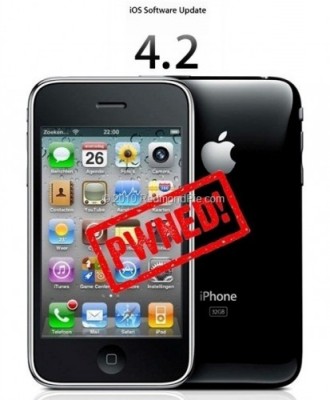
DevTeam released PwnageTool 4.2 utility. It is able to create a custom IPSW that can perform an untethered jailbreak on iOS 4.2.1. As usual it can preserve baseband version for unlockers. Devteam used the same method that was implemented in greenpois0n.

PwnageTool supports all 4.2.1 devices other than iPod touch 2G:

  • iPhone3G
  • iPhone3GS
  • iPhone4
  • iPhone4-Verizon
  • iPod touch 3G
  • iPod touch 4G
  • iPad
  • AppleTV 2G

Jailbreak is even improved compared to GreenPois0n RC6:


Read the rest of this entry »

pwnagetool-42

DevTeam released PwnageTool 4.2 utility. It is able to create a custom IPSW that can perform an untethered jailbreak on iOS 4.2.1. As usual it can preserve baseband version for unlockers. Devteam used the same method that was implemented in greenpois0n.

PwnageTool supports all 4.2.1 devices other than iPod touch 2G:

  • iPhone3G
  • iPhone3GS
  • iPhone4
  • iPhone4-Verizon
  • iPod touch 3G
  • iPod touch 4G
  • iPad
  • AppleTV 2G

Jailbreak is even improved compared to GreenPois0n RC6:


Read the rest of this entry »

iOS 4.2 Jailbreak

The Chronic Dev-Team has announced via twitter an untethered jailbreak for iOS 4.2.1. This should work for iPhone 3GS (new bootrom), iPhone 4 and iPad. And it will not require saved iOS 4.2b3 SHSH keys.

The untether is demoed in the video below. It’s a result of a collaboration between @0naj, @p0sixninja, and @pod2g. P0sixninja has previously said it will not require iOS 4.2b3 SHSH blobs.

A small bug with wifi still remains. They will release utility as soon as they fix it.

Here is a video proof:


Read the rest of this entry »

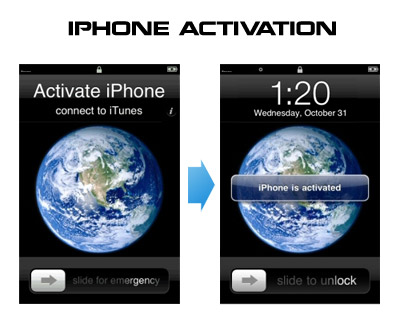
Having problems activating your iPhone? Don’t have original SIM-card? Cannot get passed emergency unlock screen? We have a solution:

If you have iPhone 3G, just use redsn0w to jailbreak and hactivate. If you have iPhone 3GS or iPhone 4 follow these instructions:

If you are already Jailbroken:

So you have an iPhone with iOS 4.0, but don’t have the original SIM and stuck on the Emergency Call Screen:

  1. Download ifunbox software (download link)
  2. Run ifunbox software and sync with phone
  3. Go to /private/var/root/Library/, delete original lockdown folder and put this lockdown folder after you extract it from the zip file
  4. Restart phone

If you are not jailbroken


Read the rest of this entry »

That was funny when people started jailbreaking iPhone’s inside Apple Stores. The fun ended because stores started banning jailbreakme.com from their WiFi networks. Well, it looks like it didn’t help.

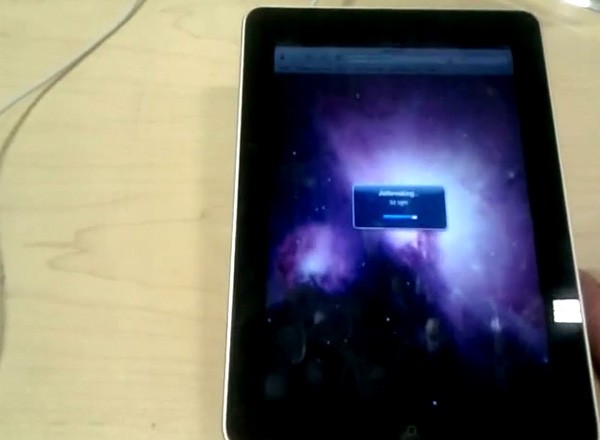
One Apple fan published a video where he jailbreaks iPad by using his Nexus One’s mobile hotspot capabilities. Take a look at the video after the break:


Read the rest of this entry »

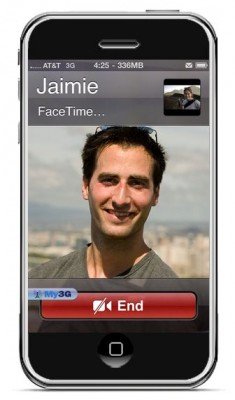
FaceTime feature gives users the possibility to make  voice calls. Apple restricted this feature to Wi-Fi only. Today it became possible to use it over 3G!

Setup Instructions:

  1. Jailbreak your iPhone 4 via www.jailbreakme.com.
  2. Download and upgrade to the latest Cydia package.
  3. Open Cydia, Go to Manage then Sources.
  4. Click Sources, Edit then add: http://apt.modmyi.com
  5. Search for “My3G” — download, and install it. It costs $2.79. My3G makes Apps believe that they are on WiFi instead of 3G.
  6. Go through the Rock setup process with a username and password. Open My3G and leave all settings on the default.
  7. FaceTime should now work over 3G! — Make sure to “Forget” the WiFi network you are on (via iOS settings) if you want to test it.

We haven’t seen any difference between the 3G FaceTime call and a WiFi FaceTime call. The quality is very good.

Here’s a video demo:


Read the rest of this entry »

Here’s an interesting video from MuscleNerd, who jailbreaks an iPad using JailBreakMe in a plane (over New Mexico via “Gogo Inflight Internet” wifi). Nice!!

spirit_jailbreak

The first release of Spirit had a bug that accidently could delete all of your photos from the device that was jailbroken. If you have a backup which you made before jailbreaking your iPhone/iPod Touch/iPad, here is a quick guide how to recover deleted photos.

Read the rest of this entry »