App | Jailbreak iPhone, iPod Touch, iPad - Part 13 Skip to content

Jailbreak iPhone, iPod Touch, iPad

новости про джейлбрейк iPhone, iPod Touch и iPad

Archive

Tag: app

noupdate501

Apple has recently released iOS 5.0.1. It is still tethered jailbreakable. However if you want untethered jailbreak or unlock – you should stay away from 5.0.1

Earlier this week pod2g reported that a code signing bug found in iOS 5.0 will make it easier for hackers to develop a full jailbreak for iOS 5 firmware version. That bug might have been closed in iOS 5.0.1. UPDATE: According to pod2g the bug is still present, but harder to exploit because another exploit found by Charlie Miller is fixed in iOS 5.0.1.

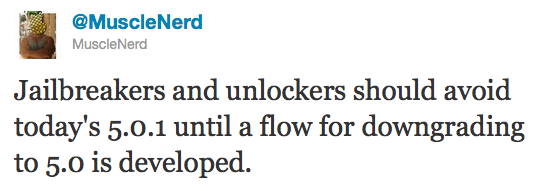
Also, MuscleNerd via twitter has warned iOS users that there is no downgrade from iOS 5.0.1 to iOS 5.0 yet and he recommends to wait until downgrade mechanism is available.

Jailbreakers and unlockers should avoid today’s 5.0.1 until a flow for downgrading to 5.0 is developed.

Downgrade flow needs to be modified for AP “nonce” http://is.gd/b3G0io … saved SHSH blobs are not enough to downgrade to 5.0


voomapeel

Vooma announced a new case for iPhone that includes a backup battery and a slot for SIM-card. The case can work with the app on jailbroken iPhone that emulates the native phone app to make calls via the external SIM card.


Read the rest of this entry »

redsn0w-099b8

The iPhone Dev-Team has updated RedSn0w with support for jailbreaking iOS 5.0.1 beta which was recently released for iOS developers.

RedSn0w 0.9.9b8 recognizes 5.0.1 beta and you don’t have to “point at 5.0 IPSW” any more. Since the IPSW isn’t public, you’ll still need to provide it once to redsn0w (Extra -> Select IPSW).


Read the rest of this entry »

semitethered

Iinstructions how to change tethered iOS 5 jailbreak to a semi tethered jailbreak are available here.

ios5tweakcomp

iOS 5 is currently jailbreakable using redsn0w 0.9.9b5 or sn0wbreeze 2.8b8. So developers are working hard to update their apps and tweaks to work with iOS 5. Here is a useful spreadsheet, where you can find information, whether or not your favorite Cydia tweak or app is compatible with iOS 5:


Read the rest of this entry »

ultrasn0w-124

The iPhone Dev-Team has released an update to their UltraSn0w unlock bringing support for iOS 5. Remember that NO new basebands are supported in this release. It only adds support for iOS 5 with old basebands.

Here is the list of supported basebands:

  • iPhone 4: 01.59.00
  • iPhone 3G/3GS: 04.26.08, 05.11.07, 05.12.01, 05.13.04, 06.15.00.

If have one of the above baseband version and need unlock you can upgrade to iOS 5 without updating your baseband using RedSn0w 0.9.9b5.

Ultrasn0w 1.2.4 is available in Cydia.


Read the rest of this entry »

jailbreak

UPDATE: Apple latest firmware is iOS 5.1.1. Apple has stopped signing all other firmwares, including iOS 5.0.1, iOS 4.3.3 and iOS 4.3.5. This means you can NOT restore to 5.0.1/4.3.3/4.3.5 any more (both original and custom), unless you have saved your SHSH keys for it.

If you have decided to perform an untethered jailbreak and unlock, you need to get the following information:

  1. What type of device do you have (iPhone 3G/3GS/4, iPod Touch 3G/4G, iPad 1/2, Apple TV)?
  2. Do you need unlock (if your iPhone locked to one carrier and you want to use it with another)?
    The answer is NO, if the device is not iPhone, if it was purchased as factory unlocked and can be used with any cellular carrier (f.e. in Canada, France, etc).
    If the answer is YES, you need to find out your modem version (Setting-General-About-Modem).
  3. What firmware version do you have? Take a look at Setting-General-About-Version. For example it could be iOS 4.3.3.
  4. What operating system do you use on your desktop (Windows, Mac OS)?

How to perform jailbreak, when you do NOT need an unlock

For iPhone 3G the latest is iOS 4.2.1. You can perform jailbreak with any utility. For iOS 4.2.1 you can also use them or GreenPois0n (Windows, Mac OS).

iPad 2 jailbreak is available only for iOS 4.3.3 via JailbreakMe and and iOS 5.0.1 via Absenthe.

iPhone 4S jailbreak is available for iOS 5.0 / iOS 5.0.1 via Absenthe.

iOS 4.3.3

Apple stopped signing iOS 4.3.3, so you cannot update to iOS 4.3.3 without SHSH keys saved (in advance some time ago). If you have iPhone 4, iPhone 3GS, iPad 1, iPod Touch 3G or iPod Touch 4G that run iOS 4.3.3 – use JailbreakMe or RedSn0w to untether jailbreak your device.

If you have saved SHSH keys for iOS 4.3.3 you can use PwnageTool (Mac OS) or Sn0wBreeze (Windows).

iOS 4.3.4/4.3.5

For iOS 4.3.4/4.3.5 only tethered jailbreak is possible with redsn0w. Tethered means that each time you restart your device you will have to connect it to a computer and run redsn0w. The untethered iOS 4.3.5 jailbreak is possible only for iPhone 3GS with old bootrom. You can detect your bootrom version using this tutorial.

iOS 5

To jailbreak and unlock iOS 5 use latest version of redsn0w 0.9.9 or sn0wbreeze 2.8. You can jailbreak tethered or semi-tethered.

The untethered iOS 5 jailbreak is possible only for iPhone 3GS with old bootrom. You can detect your bootrom version using this tutorial.

iOS 5.0.1

For iPhone 4/3GS, iPad 1, iPod Touch 3G/4G an untethered jailbreak is available for iOS 5.0.1. For untethered jailbreak use the latest redsn0w 0.9.10 or Corona – package from Cydia to untether currently installed tethered jailbreak.

Tutorial how to untether installed tethered jailbreak is available here.

For iPhone 4S and iPad 2 use Absenthe.

For tethered iOS 5.0.1 jailbreak you an use redsn0w 0.9.9 and sn0wbreeze 2.8.

iOS 5.1 / iOS 5.1.1

For now only tethered jailbreak is available for iPhone 4/3GS, iPad 1 and iPod Touch 3G/4G for iOS 5.1 and iOS 5.1.1.

You can download all firmwares here.

Tutorials

Here are our step-by-step tutorials that will guide you through the jailbreak process:

iphone4s iPhone 4S

UnTethered jailbreak iOS 5.0 / iOS 5.0.1:

iphone-4 iPhone 4

Tethered jailbreak iOS 5.1.1:

Tethered jailbreak iOS 5.1:

UnTethered jailbreak iOS 5.0.1:

Semi-Tethered jailbreak iOS 5:

Tethered jailbreak iOS 4.3.5:

UnTethered jailbreak iOS 4.3.3:


Read the rest of this entry »

redsn0w-099b1 redsn0w-099b1-extra

MuscleNerd has announced via Twitter that jailbreak utility RedSn0w 0.9.9b1 is released with major update and numerous new features:

Major improvements and features added to redsn0w 0.9.9b1! See update #9 at http://is.gd/6eek4Y Feedback: @redsn0w_testers

Indeed the list of new features is quite high. There are two main ones:

  • There is no need to download firmware any more. There is no need to push Browse IPWS button any more (but you still can).
  • Developers added lots of functionality to work with SHSH keys (extract, submit, download, verify, stitch etc)

However this new version does not bring features like untethered jailbreak for iOS 4.3.5 or iOS 5.

Due to some possible bugs we still recommend to use the old RedSn0w 0.9.8b7b, but the new 0.9.9b1 is worth seeing and playing with.

Here are links to our RedSn0w 0.9.8b7b iOS 4.3.5 jailbreak tutorials:

You can download RedSn0w 0.9.9b1 here:

Here is the full list of features from DevTeam:


Read the rest of this entry »

MyGreatFest

Hackers from the Chronic Dev Team recently announced that they have found 5 userland exploits in iOS 5. To us this means that it is very likely that an untethered jailbreak will be available for the upcoming firmware release.

P0sixninja made the announcement at MyGreatFest jailbreak conference held in London, England.

While this is a “record breaking number of exploits found”, userland exploits can be easily fixed via a minor software update. The exploits are kept in secret, so hopefully Apple won’t fix them before the expected iOS 5 launch next month.

The jailbreak is expected for all devices, including iPhone 3GS, iPhone 4, iPad, iPad 2, iPod Touch and even future iPhone 4S and iPhone 5.

MuscleNerd, hacker from DevTeam, has announced via Twitter that a major update to RedSn0w is coming soon.

There will be no need to select an IPSW. Rather than requiring ipsw selection, RedSn0w will now automatically fetch the important pieces directly from Apple (and caches them so that it never needs to re-fetch them again). New version also brings the ability to save and submit SHSH Blobs to Cydia.

Will be pushing out a major redsn0w feature upgrade before my trip to Korea: http://is.gd/PMAdT1 (and look, no IPSW selection button!)

The new version of RedSn0w is expected to be released on Monday.

Check out the screenshots below:

new-redsn0w new-redsn0w-1


Read the rest of this entry »