IPod Touch 4G | Jailbreak iPhone, iPod Touch, iPad - Part 8 Skip to content

Jailbreak iPhone, iPod Touch, iPad

новости про джейлбрейк iPhone, iPod Touch и iPad

Archive

Tag: iPod Touch 4G

gp_web_win

These are step-by-step instructions on how to jailbreak iOS 4.2.1 on iPhone 3GS, iPhone 4, iPad, iPod Touch 2G, iPod Touch 3G, iPod Touch 4G using Greenpois0n for Windows. Tutorial for Mac OS X users is available here. All the steps are the same for all devices, we will cover iPhone.

Greenpois0n has been updated to support the iOS 4.1 and iOS 4.2.1 firmware. Use Limera1n if you want to jailbreak iOS 4.0, iOS 4.0.1, iOS 4.0.2.

Remember: Greenpois0n recommends a clean restore before continuing.

Unlockers: do not update to iOS 4.1 or iOS 4.2.1 if you need the unlock. Ultrasn0w does not support that baseband yet. The only exception is the iPhone 4. Experienced users can also try update to iOS 4.2.1 without upgrading your baseband by using TinyUmbrella. Start TSS Server->Start iTunes->Plug in your iPhone->Restore 4.2.1->Error 1013->Put phone into DFU Mode->Launch Greenpois0n.

We are not authors of this app. We do not promise that everything will go well, use this tutorial at your own risk.

Step One
Open your web browser and download the latest Windows version of GreenPois0n from here.


Read the rest of this entry »

greenpois0n-rc5

The Chronic Dev-Team has released Greenpois0n for Windows which brings an untethered jailbreak to iOS 4.2.1 devices. You can jailbreak iPhone 4, iPhone 3GS, iPod Touch 2G, iPod Touch 3G, iPod Touch 4G, iPad.

You can download the latest version of GreenPois0n from here.

Update: Step-By-Step tutorial

gp_web

These are step-by-step instructions on how to jailbreak iOS 4.2.1 on iPhone 3GS, iPhone 4, iPad, iPod Touch 2G, iPod Touch 3G, iPod Touch 4G using Greenpois0n for Mac OS X. Tutorial for Windows users is available here. All the steps are the same for all devices.

Greenpois0n has been updated to support the iOS 4.1 and iOS 4.2.1 firmware. Use Limera1n if you want to jailbreak iOS 4.0, iOS 4.0.1, iOS 4.0.2.

Remember: Greenpois0n recommends a clean restore before continuing.

Unlockers: do not update to iOS 4.1 or iOS 4.2.1 if you need the unlock. Ultrasn0w does not support that baseband yet. The only exception is the iPhone 4. You can unlock iPhone 4 with iOS 4.1 using ultrasn0w. Experienced users can also try update to iOS 4.2.1 without upgrading your baseband by using TinyUmbrella. Start TSS Server->Start iTunes->Plug in your iPhone->Restore 4.2.1->Error 1013->Put phone into DFU Mode->Launch Greenpois0n.

We are not authors of this app. We do not promise that everything will go well, use this tutorial at your own risk.

Read the rest >>>>

gp_web

These are step-by-step instructions on how to jailbreak iOS 4.2.1 on iPhone 3GS, iPhone 4, iPad, iPod Touch 2G, iPod Touch 3G, iPod Touch 4G using Greenpois0n for Mac OS X. Tutorial for Windows users is available here. All the steps are the same for all devices, we will cover iPhone.

Greenpois0n has been updated to support the iOS 4.1 and iOS 4.2.1 firmware. Use Limera1n if you want to jailbreak iOS 4.0, iOS 4.0.1, iOS 4.0.2.

Remember: Greenpois0n recommends a clean restore before continuing.

Unlockers: do not update to iOS 4.1 or iOS 4.2.1 if you need the unlock. Ultrasn0w does not support that baseband yet. The only exception is the iPhone 4. Experienced users can also try update to iOS 4.2.1 without upgrading your baseband by using TinyUmbrella. Start TSS Server->Start iTunes->Plug in your iPhone->Restore 4.2.1->Error 1013->Put phone into DFU Mode->Launch Greenpois0n.

We are not authors of this app. We do not promise that everything will go well, use this tutorial at your own risk.

Step One
Open your web browser and download the latest Mac version of GreenPois0n from here.


Read the rest of this entry »

greenpois0n-rc5

The Chronic Dev-Team has finally released the new version of Greenpois0n, which features a full untethered jailbreak for iOS 4.2.1. No SHSH blobs needed. The exploit used has already been patched in iOS 4.3, so it not work on future iOS 4.3.

You can jailbreak iPhone 4, iPhone 3GS, iPod Touch 2G, iPod Touch 3G, iPod Touch 4G, iPad and Apple TV 2G. Unlike redsn0w 0.9.6 this is untethered, so there is no need to connect iOS device to a computer after restart.

There is only Mac OS X version available. Chronic Dev-Team will release Windows and probably Linux version soon.

Unlockers: do not update to stock iOS 4.2.1. You should keep your baseband version. Wait for new version of PwnageTool.

You can download GreenPois0n RC5 from here.

UPDATE: Step-by-step tutorial

betatest

The iPhone Dev team has just released the second beta of their untethered RedSn0w jailbreak (the first beta has been released few hours ago and has more bugs).

New jailbreak is called “Jailbreak Monte”, as it uses new “backup method”. The iPhone Dev Team warns that their beta-version is not a general release and you should back up all your media before using it. There are also other limitations and bugs:


Read the rest of this entry »

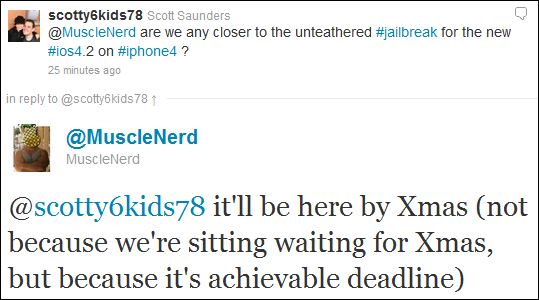
MuscleNerd from iPhone DevTeam tweeted that an untethered jailbreak solution for iOS 4.2.1 will be released soon, probably next week.

scotty6kids78: @MuscleNerd are we any closer to the unteathered #jailbreak for the new #ios4.2 on #iphone4 ?

MuscleNerd: @scotty6kids78 it’ll be here by Xmas (not because we’re sitting waiting for Xmas, but because it’s achievable deadline)

This untethered solution will be applicable to all current iOS 4.2.1 devices, including iPhone 4, iPhone 3GS, iPad, Apple TV 2G and iPod touch 4G. We will keep you updated.

iOS 4.2 Jailbreak

Next iPhone/iPod/iPad firmare iOS 4.2 is due out soon. What can we expect in terms of jailbreaking 4.2?

Limera1n exploit for 4.2 in most cases is a tethered jailbreak. That means if you have to reboot your device, it will show a “connect to itunes” logo until you run the jailbreak software again.

  • iPhone 3G – will run 4.2 untethered. Redsn0w will be updated.
  • iPhone 3GS – old bootrom will run 4.2 untethered if done via Pwnagetool while updating from 4.1. Otherwise it will be tethered.
  • iPhone 4 – tethered
  • iPod 2G – untethered.
  • iPod Touch 3G, iPod Touch 4G – tethered
  • iPad – tethered.

Tethered jailbreak isn’t that bad for iPads and iPods. But if something happens and your iphone reboots while you’re away from your computer, you cant use the device until you get home and run some tool on your computer again.

We suggest not updating until new expoit will be implemented in new utility.

The community is working on a solution to this to either make the jailbreak untethered or at least semi-tethered. Semi-tethered means the device will at least reboot, but unjailbroken while on the road until you return to your computer.

These are instructions on how to jailbreak your iPhone using PwnageTool 4.1 for Mac OS X. If you need unlock and you have not updated to iOS 4 you will be able to preserve baseband and unlock iPhone using ultrasn0w.

This guide will work for iPhone 4, iPhone 3GS, iPhone 3G, iPod Touch 3G, iPod Touch 4G, iPad and AppleTV. Just use the right firmware and select the right device (step four).

Step One
Make a folder called “Pwnage” on the desktop. Now you need to download there PwnageTool 4.1 from here and iOS 4.1 firmware from here.

When downloading the IPSW file, it is best to download it with Firefox since Safari often auto extracts it!

pwnagetool-41-1

Step Two
Double click to mount PwnageTool then drag the PwnageTool icon into the Pwnage folder.

Read the rest of this entry

The iPhone DevTeam has just released jailbreak utility PwnageTool 4.1 for Mac OS X.

PwnageTool allows you to restore to a custom IPSW file. The main advantage of PwnageTool is for unlockers. It gives the ability to keep current baseband and preserve ultrasn0w unlock. This is only for those, who have not updated to iOS 4.1 by themseleves.

You can also add whatever packages you want in the “Expert” mode of PwnageTool, if you wish to pre-install something from Cydia.

Here is a list of supported devices:

  • iPhone4
  • iPhone 3GS
  • iPhone 3G
  • iPad (firmware 3.2.2)
  • AppleTV 2G
  • iPod touch 4G
  • iPod touch 3G

You can download PwnageTool 4.1 here.