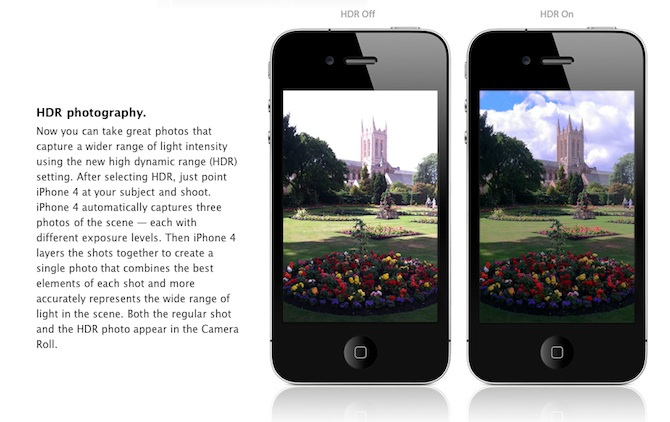
Are you looking forward to add a very popular HDR feature to your old iPhone? Do not worry! If you have a jailbroken (or ready to jailbreak) iPhone 3GS or 3G that runs on iOS 4.1, you can enable HDR photos. Here is a quick tutorial:
Are you looking forward to add a very popular HDR feature to your old iPhone? Do not worry! If you have a jailbroken (or ready to jailbreak) iPhone 3GS or 3G that runs on iOS 4.1, you can enable HDR photos. Here is a quick tutorial:
Apple has released iOS 4.1 for the iPhone 3G, iPhone 3GS, , iPod Touch 2G, iPod Touch 3G and iPod touch 4G.
iOS 4.1 enables the Game Center social gaming network, support for High Dynamic Range (HDR) photos, and HD video uploading to YouTube. The update also fixes several bugs, including proximity sensor issues, performance issues and Bluetooth problems.
Full official changelog and download links are after the break:
 Facebook for iPhone 3.2 was released last night and now it supports the newly created function “Places”, background downloading of photos and videos in iOS 4, together with other visual enhancements, such as “pull-to-refresh” for the iPhone. However, for many users, this new version was mostly broken, with the following error “Unable to load the page” on most of its pages. Yes, and if you try to uninstall and reinstall the application, it simply refuses to “Log in”.
As it turned out, this problem occurs on jailbroken iPhones for those users who have installed the application BiteSMS from Cydia. The new Facebook application for iPhone 3.2 is not compatible with the current version of BiteSMS. So if you have installed this application, removing it from Cydia, you’ll solve this problem, at least it really helped some of the users.
We hope that the new version of BiteSMS will be released pretty soon and will be compatible with this new version of Facebook for iPhone.
 Today Adobe has announced a new Photoshop application for the devices based on iOS while giving a new image to its previous limited functional application Photoshop.com Mobile for the Apple iPhone. Now it has got a new name Adobe Photoshop Express. Here you’ll find a great number of new features for the iPad sporting the larger screen space, support for the device and improved user interface (UI).
Does it have pros and cons?
Yes! There is no support for the Retina Display of the new . It is quite disappointing for many users.
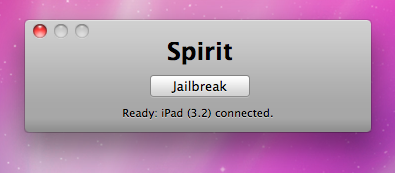
The first release of Spirit had a bug that accidently could delete all of your photos from the device that was jailbroken. If you have a backup which you made before jailbreaking your iPhone/iPod Touch/iPad, here is a quick guide how to recover deleted photos.
Read the rest of this entry »
, utility that extends traditional Copy / Paste functionality, is updated to version 1.0.1.
Here is an official changelog:
Action Menu can be installed or updated via Cydia on a jailbreaked iPhone (iPod Touch).

Apple released new iPhone 3.1 and iPod Touch 3.1.1 firmwares. Here is a quick changelog:
– Improved syncing for music, movies, TV shows, podcasts, and photos
– iTunes U content organization
– Redeem iTunes Gift Cards, codes, and certificates in the App Store
– Display available iTunes account credits in the App Store and iTunes Store
– Save video from Mail and MMS into Camera Roll
– Option to “Save as new clip” when trimming a video on iPhone 3GS
– Better iPhone 3G Wi-Fi performance when Bluetooth is turned on
– Remotely lock iPhone with a passcode via MobileMe
– Use Voice Control on iPhone 3GS with Bluetooth headsets
– Paste phone numbers into the keypad
– Option to use Home button to turn on accessibility features on iPhone 3GS
– Warn when visiting fraudulent websites in Safari (anti-phishing)
– Improved Exchange calendar syncing and invitation handling
– Fixes issue that cause some app icons to display incorrectly
iPhone OS 3.1 is available and is a for iPhone customers. iPod Touch users already running iPhone OS 3.0 can update to 3.1.1 for free. iPod Touch users running earlier firmware versions can upgrade to OS 3.1.1 for $4.95.
Users of jailbreaked and unlocked devices – do not update, wait for utilities !!
Clippy is an iPhone addition from Cydia for copy/paste functionality. It was updated to version 0.96-1. Many issues are resolved and a lot of bugs fixed. Among these are: the ability to copy text from Safari, the ability to copy text from messages or biteSMS and Fix for the Mail application, many different crashes, etc.
Instructions:
Install from Cydia on a jailbreaked iPhone or iPod Touch.
Here are several photos that show how works:
This application is developed by Jay Freeman, the creator of the Cydia. Veency is a free app that allows iPhone owners to remotely control their iPhone from PC or Mac desktop via a VNC client.
Here are some of the features:
Of course you cannot do two finger gestures with this app. All other actions can be done with the click of your mouse. The only area in which Veency fails tragically at is when opening any video recording application on the iPhone.
This application is avaliable for jailbreaked iPhones via Cydia installer.
Be sure to restart your iPhone after installing Veency and connect to the server using a Wi-Fi connection. We recommend using or to connect your Windows desktop. If you’re using a Mac, we recommend .
Here is a video demonstration:
via readwriteweb