Update | Jailbreak iPhone, iPod Touch, iPad - Part 27 Skip to content

Jailbreak iPhone, iPod Touch, iPad

новости про джейлбрейк iPhone, iPod Touch и iPad

Archive

Tag: update

Yes, DevTeam released new version of their software. First of all, please, do NOT use unofficial software from unknows sites (f.e. quickpwm.com). We recommend to download from torrent or official mirors.

We regulary publish latets software and firmware links. Use them or the same ones from DevTeam site.

So:

  • iPhone 2G and iPod Touch: update to 2.2.1 with iTunes and run QuickPwn to jailbreak, activate and unlock you device.
  • iPod Touch 2G: sorry, you need to wait a bit more
  • iPhone 3G + NO UNLOCK: If you do not need unlock, you are using your iPhone with one carrier or you hae factory unlcoked iPhone, just restore or upgrade to 2.2.1 using iTunes and use QuickPwn to jailbreak and add Cydia and Installer.
  • iPhone 3G + UNLOCK: you need to preserve current baseband software. Preserving the baseband will ensure that you can still use “yellowsn0w” the iPhone 3G unlock application. To upgrade your phone to 2.2.1 and preserve the state of the baseband you need to create a custom .ipsw with PwnageTool. This custom .ipsw will not contain the baseband update but of course will still allow all the cool new stuff from 2.2.1. PwnageTool is only available for Mac OS X.

DevTeam updated yellowsn0w to version 0.9.7 to work with modified (!!!) firmware 2.2.1, in which you preserve old baseband from firmware 2.2.
Here is an anouncement from DevTeam. They suggest to not update to the new firmware 2.2.1 yet. You can loose the ability to jailbreak and unlock. Just wait for them to check everything and release new software.

DevTeam says that 2.2 update SHOULD NOT be applied using iTunes if you want the chance of a soft-unlock in the near future. Use new version of PwnageTool (not avaliable yet, but will be soon).

Some fact:

  • The 2.2 firmware for 3G contains a baseband update for the 3G iPhone
  • The 2.2 firmware for 2G (1st gen iPhones) doesn’t contain a baseband update and the baseband is still at 04.05.04
  • Pwnage technique (and therefore the Jailbreak) isn’t affected, but PwnageTool and QuickPwn do not support this release as yet, so DO NOT install 2.2 using iTunes as you will lose your jailbreak


Read the rest of this entry »

SwirlyMMS, application to send and receive mms, is updated to v1.2.9. Several bugs are fixed. See the changelog below.

Avaliable in Cydia for jailbreaked iPhones.

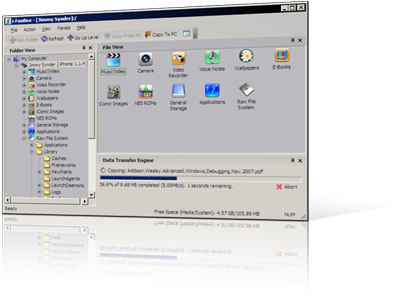
I use iFunBox a lot. This is a very useful utility for jailbreaked iPhones. Recently it was updated to version 0.7.224.86. Here is a download link.
What’s New:
1. Thumbnail view supported for wallpapers, camera and all other folders.
2. Support Symlink for the filesystem of firmware 2.0. All .app can be listed in Application folder.
3. Downloading music and movie from iPhone with filename encoded with album name and artist name.
4. Support E-Books, converting plain text to UTF-16 automatically.
5. Support Book Shelf, converting plain text to UTF-8 automatically.

Limitations:
Uploading music and movie to iPhone is now disabled on devices with firmware 2.x.

We had a post about SBSettings – the future of BossPrefs (link). Couple days ago this application became  avaliable in Cydia.

SBSettings doenst have an icon so after you install to access it you must slide across the statusbar (aka the top bar that displays service, time, battery, etc.)

Current version is 0.92. But the application is updated almost every day.

This application is avaliable for jailbreaked iPhones via Cydia installer.

SwirlyMMS is updated to v1.2.8. Many bugs are fixed.

Avaliable in Cydia for jailbreaked iPhones.

This is a step-by-step tutorial. If you have iPhone 3G this guide will help you jailbreak and activate the device. For iPhone 2G it will also perform the unlock.

I recommend using 2.2 firmware, because iPhone 3G unlock is avaliable now. But you can use it with old v2.1, v2.0.1 and v2.0.2.


Read the rest of this entry »

PdaNet updated to version 1.33. This tool allows you to connect any desktop or notebook to internet through iPhone 3G. Here is a changelog:

This application is avaliable via Cydia Installer for jailbreaked iPhones.

I was amazed that very few people know how to turn auto-correction off. Here is what you need:

  • Jailbreak your iPhone and install Cydia
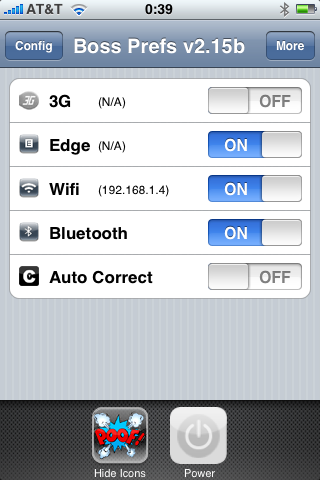
  • Install BossPrefs
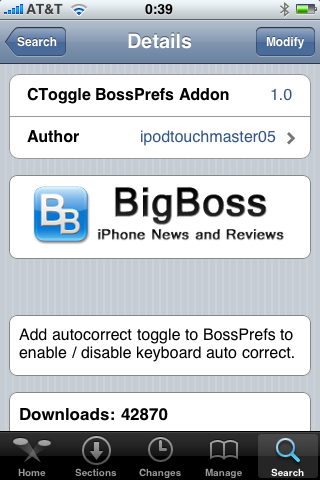
  • Install CToggle BossPrefs Addon
  • Run BossPrefs and turn auto-correction off

There is even a domain: http://please-let-us-disable-autocorrection-steve.com.. Nice.