Less | Jailbreak iPhone, iPod Touch, iPad - Part 2 Skip to content

Jailbreak iPhone, iPod Touch, iPad

новости про джейлбрейк iPhone, iPod Touch и iPad

Archive

Tag: less

absinthe2

Xvolks has posted a video demonstrating the iOS 5.1.1 untethered jailbreak using the new yet unreleased utility Absinthe 2.0.

I’ve tested Absinthe v2 on my iPhone 4 GSM, iOS 5.1.1. It jailbroke it flawlessly. I’ve took a (bad) video of it 😉

The video was later removed from the public, but you know there is nothing that can be hidden 🙂

Read the rest of this entry »

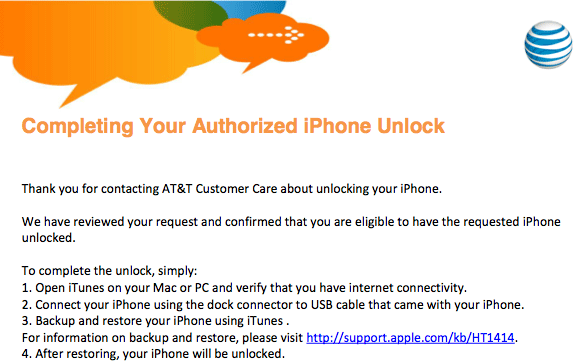
As announced, AT&T has begun unlocking off contract iPhones for customers. TNW details the procedure. If you quality you can contact the company via phone, chat, or in-store.

The only piece of information required by AT&T is the International Mobile Equipment Identity (IMEI) number, which can be found under Settings -> General ->About on your device. Then in 72 hours you will receive email confirmation.

The maximum amount of unlock codes that can be given to an account is 5/year. You can see a copy of the unlock confirmation below.

iphone-unlock

jailbreak

UPDATE: Apple latest firmware is iOS 5.1.1. Apple has stopped signing all other firmwares, including iOS 5.0.1, iOS 4.3.3 and iOS 4.3.5. This means you can NOT restore to 5.0.1/4.3.3/4.3.5 any more (both original and custom), unless you have saved your SHSH keys for it.

If you have decided to perform an untethered jailbreak and unlock, you need to get the following information:

  1. What type of device do you have (iPhone 3G/3GS/4, iPod Touch 3G/4G, iPad 1/2, Apple TV)?
  2. Do you need unlock (if your iPhone locked to one carrier and you want to use it with another)?
    The answer is NO, if the device is not iPhone, if it was purchased as factory unlocked and can be used with any cellular carrier (f.e. in Canada, France, etc).
    If the answer is YES, you need to find out your modem version (Setting-General-About-Modem).
  3. What firmware version do you have? Take a look at Setting-General-About-Version. For example it could be iOS 4.3.3.
  4. What operating system do you use on your desktop (Windows, Mac OS)?

How to perform jailbreak, when you do NOT need an unlock

For iPhone 3G the latest is iOS 4.2.1. You can perform jailbreak with any utility. For iOS 4.2.1 you can also use them or GreenPois0n (Windows, Mac OS).

iPad 2 jailbreak is available only for iOS 4.3.3 via JailbreakMe and and iOS 5.0.1 via Absenthe.

iPhone 4S jailbreak is available for iOS 5.0 / iOS 5.0.1 via Absenthe.

iOS 4.3.3

Apple stopped signing iOS 4.3.3, so you cannot update to iOS 4.3.3 without SHSH keys saved (in advance some time ago). If you have iPhone 4, iPhone 3GS, iPad 1, iPod Touch 3G or iPod Touch 4G that run iOS 4.3.3 – use JailbreakMe or RedSn0w to untether jailbreak your device.

If you have saved SHSH keys for iOS 4.3.3 you can use PwnageTool (Mac OS) or Sn0wBreeze (Windows).

iOS 4.3.4/4.3.5

For iOS 4.3.4/4.3.5 only tethered jailbreak is possible with redsn0w. Tethered means that each time you restart your device you will have to connect it to a computer and run redsn0w. The untethered iOS 4.3.5 jailbreak is possible only for iPhone 3GS with old bootrom. You can detect your bootrom version using this tutorial.

iOS 5

To jailbreak and unlock iOS 5 use latest version of redsn0w 0.9.9 or sn0wbreeze 2.8. You can jailbreak tethered or semi-tethered.

The untethered iOS 5 jailbreak is possible only for iPhone 3GS with old bootrom. You can detect your bootrom version using this tutorial.

iOS 5.0.1

For iPhone 4/3GS, iPad 1, iPod Touch 3G/4G an untethered jailbreak is available for iOS 5.0.1. For untethered jailbreak use the latest redsn0w 0.9.10 or Corona – package from Cydia to untether currently installed tethered jailbreak.

Tutorial how to untether installed tethered jailbreak is available here.

For iPhone 4S and iPad 2 use Absenthe.

For tethered iOS 5.0.1 jailbreak you an use redsn0w 0.9.9 and sn0wbreeze 2.8.

iOS 5.1 / iOS 5.1.1

For now only tethered jailbreak is available for iPhone 4/3GS, iPad 1 and iPod Touch 3G/4G for iOS 5.1 and iOS 5.1.1.

You can download all firmwares here.

Tutorials

Here are our step-by-step tutorials that will guide you through the jailbreak process:

iphone4s iPhone 4S

UnTethered jailbreak iOS 5.0 / iOS 5.0.1:

iphone-4 iPhone 4

Tethered jailbreak iOS 5.1.1:

Tethered jailbreak iOS 5.1:

UnTethered jailbreak iOS 5.0.1:

Semi-Tethered jailbreak iOS 5:

Tethered jailbreak iOS 4.3.5:

UnTethered jailbreak iOS 4.3.3:


Read the rest of this entry »

ios_4_3_4

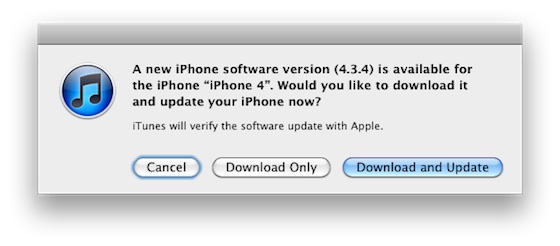
Apple has released iOS 4.3.4 to block the PDF exploit used by comex in JailbreakMe utility. JailbreakMe can wireless jailbreak all devices on iOS 4.3.3.

iOS 4.3.4 Software Update
Fixes security vulnerability associated with viewing malicious PDF files.

Products compatible with this software update:
iPhone 4 (GSM model)
• iPhone 3GS
• iPad 2
• iPad
iPod touch (4th generation)
• iPod touch (3rd generation)

For iPhone 4 Verizon Apple released iOS 4.2.9.

The official information is available here: http://support.apple.com/kb/HT1222

iOS_5

Apple recently released iOS 5 beta and iTues 10.5 beta. It is available only for Apple registered developers. But you can try it too. Remember that you do it at your own risk. Below you will find iOS 5 download links for iPhone 3GS, iPhone 4, iPod Touch 3G, iPod Touch 4G, iPad 1, iPad 2, Apple TV 2G and download links to iTunes 10.5 Mac and Windows.

Keep in mind that your iDevice will need to be activated, your UUID needs to be registered in Apple. Installing iOS beta on a non-activated device will render it useless. If you need help with registering UUID – write us, we will try to help..

Remember that currently there is no jailbreak for iOS 5 released.

You can download iOS 5.0 beta 1 and iTunes 10.5 beta here.

iphone-4-jailbreak

It seems that jailbreaking of iOS devices become a really profitable business, at least for Kevin Lee, a George Mason University senior, who managed to earn $50,000 a year by jailbreaking and unlocking iPhones. At first, it was a hobby for him that eventually grew into a real business with 30-40 clients per week asking for jailbreak, Cydia installations, graphical customizations and “unlocks” to use the iPhone on wireless carriers otherwise unsupported by Apple.  To achieve success, Kevin posted posting a “Get Your iPhone Jailbroken Today” ad on the popular online community. That helped him to get hundreds of requests. But his business goes against Apple’s rules and as far as we know, at that moment his ad was already removed from the site.

android market

This week Google has released a new version of its client app for Android Market, which will work on any smartphone running Android OS 1.6 or higher.

The company aims to facilitate the process of discovering new software and its purchase. That’s why new Android Market will have a Cover Flow-like style of app listings and include new categories like Widgets and Live Wallpapers, as currently the catalog is filled pretty much with these kinds of software. Besides that, app pages will now have more info and links to related content.

Read the rest of this entry »

MobileTerminal-iPhone4-04

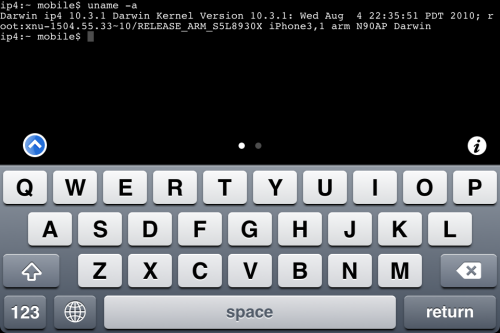
MobileTerminal is a terminal emulator application for the iPad and iPhone. The version of MobileTerminal that is available in Cydia doesn’t work with iPhone iOS 4.x. However there are beta versions that do work, but aren’t on Cydia because they are still in beta stages. This tutorial will show you step-by-step how to install MobileTerminal on iPhone with iOS 4.x (tutorial for iPad is here). If you have old version of MobileTerminal installed – uninstall it in Cydia (Search – MobileTerminal – Remove).

First of all you need to jailbreak your iPhone. If you have not done it already here is an easy tutorial: how to jailbreak iOS 4.0-4.1 on iPhone using Limera1n. After you successfully jailbreaked iPhone:

  1. Run Cydia by tapping on Cydia icon
  2. cydia_icon

  3. The Cydia will start:

Read the rest of this entry

MobileTerminal-iPad-05

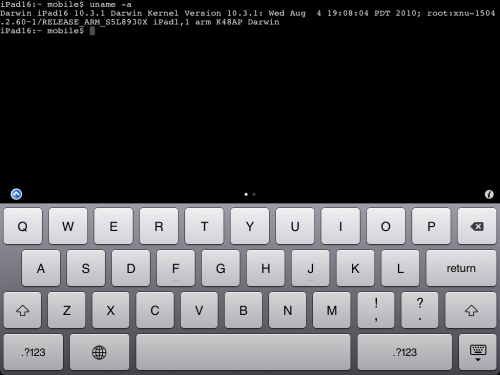
MobileTerminal is a terminal emulator application for the iPad and iPhone. The version of MobileTerminal that is available in Cydia doesn’t work with iPad iOS 3.2.2 and iPhone iOS 4.x. However there are beta versions that do work, but aren’t on Cydia because they are still in beta stages. This tutorial will show you step-by-step how to install MobileTerminal on iPad (tutorial for iPhone is here). If you have old version of MobileTerminal installed – uninstall it in Cydia (Search – MobileTerminal – Remove).

First of all you need to jailbreak your iPad. Here is an easy tutorial: how to jailbreak iPad with iOS 3.2.2 using Limera1n. After you successfully jailbreaked iPad:

  1. Run Cydia by tapping on Cydia icon
  2. cydia_icon

  3. The Cydia will start:

Read the rest of this entry

iOS4.14.2Jailbreak

Only a few days passed since Dev Team has confirmed that Comex will try to jailbreak iOS 4.1, using other exploit. However, according to the response received on Twitter, it became known that Comex may not take part in the new iOS 4.x jailbreak.

Comex replied to the message on Twitter in such a way: “ariif, the next jailbreak might not be from me :)”.

Of course, it does not mean that Comex leaves the scene and would not take part in jailbreaking as Geohot, most likely it is only this version he isn’t planning to jailbreak. Nevertheless the smile in his reply certainly means something good…