USB | Jailbreak iPhone, iPod Touch, iPad - Part 2 Skip to content

Jailbreak iPhone, iPod Touch, iPad

новости про джейлбрейк iPhone, iPod Touch и iPad

Archive

Tag: USB

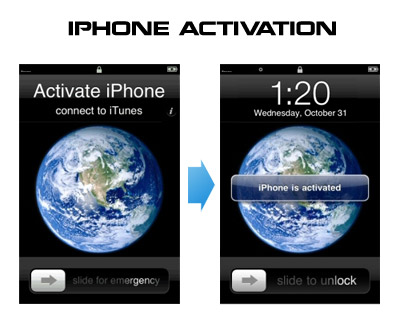
Having problems activating your iPhone? Don’t have original SIM-card? Cannot get passed emergency unlock screen? We have a solution:

If you have iPhone 3G, just use redsn0w to jailbreak and hactivate. If you have iPhone 3GS or iPhone 4 follow these instructions:

If you are already Jailbroken:

So you have an iPhone with iOS 4.0, but don’t have the original SIM and stuck on the Emergency Call Screen:

  1. Download ifunbox software (download link)
  2. Run ifunbox software and sync with phone
  3. Go to /private/var/root/Library/, delete original lockdown folder and put this lockdown folder after you extract it from the zip file
  4. Restart phone

If you are not jailbroken

Read the rest of this entry »

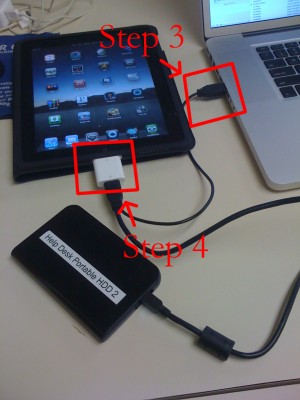
iPad USB Camera Connection Kit is much more useful as it seems. Max Sha, an experienced user, was able to access external hard drive with this kit. All you need is a jailbroken iPad, an external drive, a split-USB cable to give the drive some power and a terminal of some sort (f.e. MacBook) to mount the external storage. While it is a little unwieldy, it shows that Terabytes of external storage for iPad is possible.

Here is a complete step-by-step guide from Max Sha:


Read the rest of this entry »

spirit_jailbreak

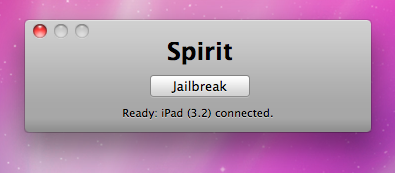
Finally the jailbreak for iPad, iPhone and iPod Touch from the Dev Team is available for download. It’s free and untethered and it’s called “Spirit”. The jailbreak supports every iDevice with firmware version 3.1.2, 3.1.3 or 3.2.


Read the rest of this entry »

itunes

Apple released iTunes 8.2. You can download it here.

This update breaks your ability to use QuickPwn, PwnageTool, and iPhone Tunneling Suite (ssh over usb). Many file managers do not work with iTunes 8.2 installed. We don’t think this is a deliberate breakage of these tools.  It’s just that Apple has updated a low-level USB protocol. It may also break Palm Pre’s connection to the device.

So if you jailbreak, we recommend you not to update.

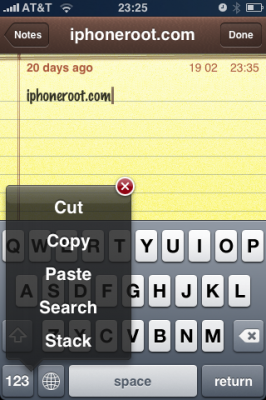
Clippy is an iPhone addition for copy/paste functionality. It was updated to version 0.98. There are significant improvements that make the application much more stable, and moreover it is important to note that starting from now, Clippit becomes a completely free.

Avaliable via Cydia and Icy for jailbreaked iPhones.

Changelog for 0.98: March 29, 2009:


Read the rest of this entry »

We had a post about SBSettings – the future of BossPrefs (link). Couple days ago this application became  avaliable in Cydia.

SBSettings doenst have an icon so after you install to access it you must slide across the statusbar (aka the top bar that displays service, time, battery, etc.)

Current version is 0.92. But the application is updated almost every day.

This application is avaliable for jailbreaked iPhones via Cydia installer.

Many users of jailbreaked iPhones use application called BossPrefs. The developer of this app is creating a new one. The new application will be called SBSettings.

The toggles drop down when you swipe along the status bar. It is very fast and can be used while in any app without exiting the app. Suppose you are in Safari but realize your 3g is not yet enabled. Just swipe the statusbar and toggle 3g, than resume in Safari where you left off. The advantage is there is no need to exit Safari and load settings or bossprefs.

The look and feel of this new app will be something like this:

via thebigboss

  • Page 2 of 2
  • <
  • 1
  • 2