ReflectiveDock is updated to version 1.4 ReflectiveDock is an extention to Winterboard, that makes dock look reflective:
![dock1 200x300 ReflectiveDock [Cydia]](http://jailbreak-iphone.ru/wp-content/uploads/2009/02/dock1.png "dock1")
![dock 200x300 ReflectiveDock [Cydia]](http://jailbreak-iphone.ru/wp-content/uploads/2009/02/dock.png "dock")
![dock2 200x300 ReflectiveDock [Cydia]](http://jailbreak-iphone.ru/wp-content/uploads/2009/02/dock2.png "dock2")
Avaliable via Cydia (ModMyi repository) for jailbreaked iPhones.
ReflectiveDock is updated to version 1.4 ReflectiveDock is an extention to Winterboard, that makes dock look reflective:
Avaliable via Cydia (ModMyi repository) for jailbreaked iPhones.
![crackulousicon Crackulous [Cydia]](http://jailbreak-iphone.ru/wp-content/uploads/2009/02/crackulousicon.png "crackulousicon")
Crackulous is an application that cracks AppStore apps. It is avaliable through Cydia for jailbreaked iPhones. Repository is http://cydia.hackulo.us
We have not tried it yet. So use it at your own risk.
via hackulo.us

Yes, DevTeam released new version of their software. First of all, please, do NOT use unofficial software from unknows sites (f.e. quickpwm.com). We recommend to download from torrent or official mirors.
We regulary publish latets software and firmware links. Use them or the same ones from DevTeam .
So:
DevTeam updated yellowsn0w to version 0.9.7 to work with modified (!!!) firmware 2.2.1, in which you preserve old baseband from firmware 2.2.
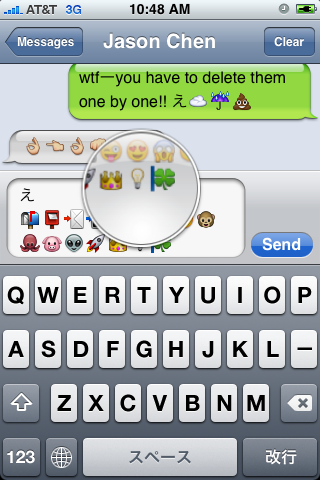
First of all these icons can be viewed on any iPhone with 2.2 firmware. But to be able to send these icons users need to perform additional actions. There are 4 ways to turn them on and 2 of them are free:
Solution N1 for $5.99:
In AppStore buy and install . Goto Settings -> Touch Dial -> Enable Smiley icon ON. Launch Touch Dial. Go to Settings -> General -> Keyboard -> International Keyboards -> Japanese and enable “Emoji.”
Solution N2 for $0.99:
In AppStore buy and install . Play with the app for a minute to activate, click on a story, etc. Go to Settings -> General -> Keyboard -> International Keyboards -> Japanese and enable “Emoji.”
Solution N3 for Free:
Jailbreak your iPhone. Run Cydia and install Emoji application (iSpazio repository). Go to Settings -> General -> Keyboard -> International Keyboards -> Japanese and enable “Emoji.”
This application adds boolean ‘true’ key KeyboardEmojiEverywhere edits in /User/Library/Preferences/com.apple.Preferences.plist. You can do it manually if you want.
Solution N3 for Free:
Step 1. Download the vcard.vcf .
Step 2. Import it to your address book program. If you are using Windows, you may want to do it on iPhone directly. Send the vcard.vcf file to yourself. Open in on iPhone’s Email.app, click the vcf file and import all the contacts.
Step 3. Go into “Settings” > “General” > “Keyboard” > “Japanese Keyboard”. Enable the QWERTY keyboard.
Step 4. In notes or any other program you want. Type “emojia”, “emojii” or “emojiu” to select those  icons.
I like Solution N3. It is free and simple. You do not need to play with contacts and etc. But you need to jailbreak an iPhone.
This is one more solution to add copy/paste functionality to iPhone. Couple days ago we wrote about Clippy. This one is called hClipboard. Avaliable via Cydia (bigboss repository) for jailbreaked iPhones.
Here is a quick tutorial how to use it:
After installing just enable it in Settings → General → Keyboard → International.
![hc hClipboard one more copy/paste solution [Cydia]](http://jailbreak-iphone.ru/wp-content/uploads/2009/01/hc.jpg "hc")
Copy:
When the keyboard appears, switch to ℏClipboard by clicking the International button (the Globe) repeatedly. Then hit the Copy button. The entire content of the text field should now appear in the top of the clipboard.
![copy 200x300 hClipboard one more copy/paste solution [Cydia]](http://jailbreak-iphone.ru/wp-content/uploads/2009/01/copy.jpg "copy")
To select portion of a text:
Move the the beginning of the range of text you want to copy. Hit the Select from here… button. Then move to the end and hit the Select to here and copy button (which is the same button) again. The entry will now appear in the clipboard.
![copy1 300x224 hClipboard one more copy/paste solution [Cydia]](http://jailbreak-iphone.ru/wp-content/uploads/2009/01/copy1.jpg "copy1")
Paste:
Just click on any item on the clipboard to paste it. The item just pasted will move to the top of the clipboard. If you need to access some older items, just scroll vertically.
![paste hClipboard one more copy/paste solution [Cydia]](http://jailbreak-iphone.ru/wp-content/uploads/2009/01/paste.png "paste")
Here ia a quick video:
via
![ima1 ImaSafari: show or hide images in webpages [Cydia]](http://jailbreak-iphone.ru/wp-content/uploads/2009/01/ima1.png "ima1")
![ima2 ImaSafari: show or hide images in webpages [Cydia]](http://jailbreak-iphone.ru/wp-content/uploads/2009/01/ima2.png "ima2")
ImaSafari allows iPhone users to turn off image downloading in Safari browser. This is very useful for GRPS, EGDE and 3G connectins. First of all webpages will be downloaded faster. Second – you will save money if you pay for inernet traffic.
This utility is avaliable for free via Cydia (for jailbreaked iPhones only).
To turn images on or off just install this software and go to Settings – Safari.
via spazio
![img 00162 Clippy: Copy/paste on iPhone [Cydia]](http://jailbreak-iphone.ru/wp-content/uploads/2009/01/img_00162.png "img_00162")
Clippy adds copy-paste functionality to iPhone and iPod Touch. It is avaliable in Cydia (iSpazio.net repository) for jailbreaked iPhones. The only limitation is you cannot select text in Safari and copy it to clipboard.

Dev Team finally made it. They created software called yellowsn0w, that unlocked iPhone 3G. Now you can use any carrier you want. I successfully unlocked my US version.It works much more stable than sim proxy method.
Please, back up everything on your iPhone before you start, just in case. Everything you do is your responsibility. I had to go through all 4 steps to make my iPhone 3G work. I used only my new sim without sim proxy.
Here are the steps:
Step 1: Restore your iPhone to version 2.2 (Not needed if you are already at 2.2 with baseband 02.28.00):
Step 2: Jailbreak your iPhone using this tutorial.
Step 3: Install yellowsn0w:
Step 4: If you still do not have signal
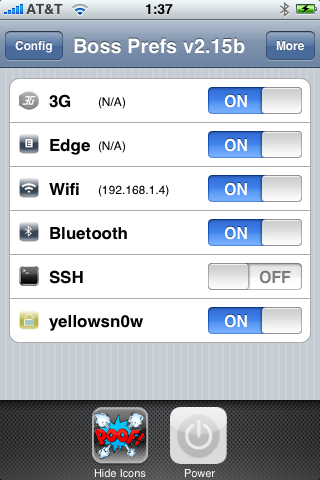
It is called . This Safari plugin is avaliable in Cydia for jailbreaked iPhones. Just add Cydia repository d.imobilecinema.com. Still in beta, but works! Watch the video: