SIM | Jailbreak iPhone, iPod Touch, iPad - Part 8 Skip to content

Jailbreak iPhone, iPod Touch, iPad

новости про джейлбрейк iPhone, iPod Touch и iPad

Archive

Tag: SIM

Is your mail crashing on 2.0 firmware?

This is generally caused after syncing your backup. This has nothing to do with jailbreaking or not. However, the fix for it is simple and is part of a jailbreak. The issue is that after syncing your backup, your mail folder is owned by root and your mail app running as user mobile does not have permissions to access it. You can fix it in SSH. But I also added a button in BossPrefs to solve it.

Step 1:Jailbreak your device

Step 2: Install BossPrefs from Cydia

Step 3: Tap “more”

Step 4: Tap “Fix User Dir Permissions”

Step 5: Sometimes, not always, you will need to load settings and reenter your mail passwords.

via sleepers.net

Thanks to Dev Team and the porting work of Jay Freeman as well as the authors of 3Proxy, it is now possible to “tether” your iPhone 3G and use its Internet connection on your laptop.

Warning – Tethering your iPhone is against the iPhone data plan terms. AT&T could slap you with huge fees if you overuse this. I recommend only using it during emergencies.

Here is a basic plan (by the way, this should work for old IPhone also):

  • Jailbreak your iPhone 3G
  • Install 3Proxy and Terminal
  • Create an ad-hoc Wi-fi network using your laptop
  • Join the network with your iPhone
  • Find the iPhone’s IP address
  • Open Terminal and run the proxy program
  • Open Safari on your iPhone and open a web page
  • Configure your browser to use the proxy

Later we’ll discuss it with more details.

Step 1: Jailbreak your iPhone


Read the rest of this entry »

iRinger creates free ringtones for your iPhone from virtually any music or video file you own. Even YouTube videos! iRinger exports ringtones to iTunes, so there is no need to “jailbreak” your iPhone. You will be creating ringtones in seconds. It’s that simple. Here is a video tutorial:

Feature:

  • FREE
  • Three Steps: Import, Preview then Export. Done.
  • Convert virtually any audio format into an iPhone ringtone
  • Extracts audio out of video
  • Choose which section of the audio you want to hear
  • Adjust ringtone length, volume, fade in, fade out and loop gap
  • Export to iPhone ringtone format and import right into iTunes
  • Export to iPhone using SCP/SFTP and skip using iTunes
  • Use audio effects: Delay, Flanger, Boost, Reverse, etc.
  • Runs on all versions of Microsoft Windows including Windows Vista
  • Requires iPhone firmware 1.1.2 or newer, iTunes software 7.5 or newer
  • Works with the new iPhone 3G!

Download here: iRinger.exe. Developer’s site: www.iringer.net

Here is an advanced video tutorial, it shows how to use some advanced features:


Read the rest of this entry »

Run

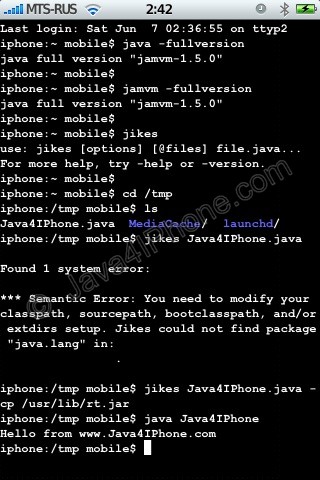
This is a tutorial, that shows step by step how to use installed Java on the IPhone. Just in case you do not have Java installed on your IPhone there is a tutorial how to do it.

What we need is a working jailbraked IPhone with Java Installed. I used latest firmware 1.1.4, unlocked, jailbreaked and customized by winpwn.

Step 1: Create simple Java application, compile and run.


Read the rest of this entry »