Error | Jailbreak iPhone, iPod Touch, iPad - Part 3 Skip to content

Jailbreak iPhone, iPod Touch, iPad

новости про джейлбрейк iPhone, iPod Touch и iPad

Archive

Tag: error

itunes

iTunes continues to serve iOS updates even if your Apple’s device was jailbroken. And if these updates are downloaded and installed occasionally, your device may be returned to  a non-jailbroken state.  Here the script, which prevents iTunes from automatically downloading updates:


Read the rest of this entry »

FixFacebookforiPhone3.2ProblemFacebook for iPhone 3.2 was released last night and now it supports the newly created function “Places”, background downloading of photos and videos in iOS 4, together with other visual enhancements, such as “pull-to-refresh” for the iPhone. However, for many users, this new version was mostly broken, with the following error “Unable to load the page” on most of its pages. Yes, and if you try to uninstall and reinstall the application, it simply refuses to “Log in”.

As it turned out, this problem occurs on jailbroken iPhones for those users who have installed the application BiteSMS from Cydia. The new Facebook application for iPhone 3.2 is not compatible with the current version of BiteSMS. So if you have installed this application, removing it from Cydia, you’ll solve this problem, at least it really helped some of the users.

We hope that the new version of BiteSMS will be released pretty soon and will be compatible with this new version of Facebook for iPhone.

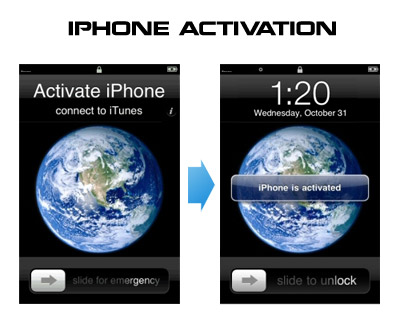
Having problems activating your iPhone? Don’t have original SIM-card? Cannot get passed emergency unlock screen? We have a solution:

If you have iPhone 3G, just use redsn0w to jailbreak and hactivate. If you have iPhone 3GS or iPhone 4 follow these instructions:

If you are already Jailbroken:

So you have an iPhone with iOS 4.0, but don’t have the original SIM and stuck on the Emergency Call Screen:

  1. Download ifunbox software (download link)
  2. Run ifunbox software and sync with phone
  3. Go to /private/var/root/Library/, delete original lockdown folder and put this lockdown folder after you extract it from the zip file
  4. Restart phone

If you are not jailbroken


Read the rest of this entry »

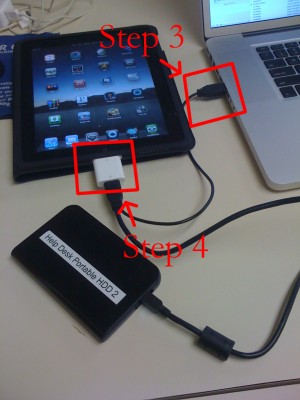
iPad USB Camera Connection Kit is much more useful as it seems. Max Sha, an experienced user, was able to access external hard drive with this kit. All you need is a jailbroken iPad, an external drive, a split-USB cable to give the drive some power and a terminal of some sort (f.e. MacBook) to mount the external storage. While it is a little unwieldy, it shows that Terabytes of external storage for iPad is possible.

Here is a complete step-by-step guide from Max Sha:


Read the rest of this entry »

This is good news for for those who use Cydia, an alternative to Apple’s AppStore for jailbreaked iPhones and iPod Touches. Saurik has uploaded a new version of APT that has an optimized cache generator and greatly improves Cydia performance:

“I also uploaded a new version of APT I’ve been working on: it has an optimized cache generator and more error tolerant repository parsing.”

When launching Cydia the next time you will find updates for some APT packages (up to 3 depending on what you have installed). Perform the install and enjoy the speed improvements!

ultrasn0w-0-8

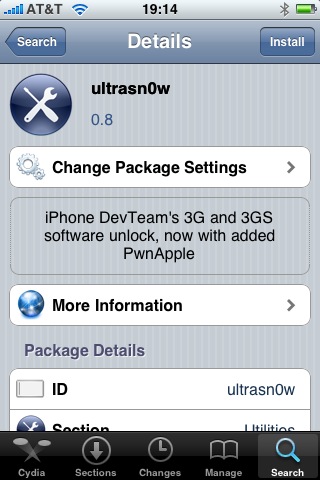
Great news for all iPhone 3GS users. DevTeam updated ultrasn0w, software that unlocks iPhone with firmware 3.0. Now it supports iPhone 3GS!

Avaliable in Cydia, repo: repo666.ultrasn0w.com

Here are quick instructions:

  1. Ensure you have firmware 3.0
  2. Jailbreak your iPhone using redsn0w (this will also install Cydia)
  3. Run Cydia
  4. Please add the repo repo666.ultrasn0w.com to Cydia. That last “o” is actually the number zero “0”! If you use the letter “o” you’ll get an error.
  5. Search for ‘ultrasn0w’ in cydia or icy and install ultrasn0w
  6. Reboot your iPhone 3G
  7. T-Mobile USA users should disable 3G before using ultrasn0w
  8. Enjoy
  9. If you have any problems reset your network settings (it helped many users): Settings->General->Reset->Reset Network Settings

unlock

DevTeam released Ultrasn0w – application that will unlock your iPhone 3G with firmware 3.0. Here are the instructions:

  1. Ensure you have upgraded to iPhone OS 3.0
  2. Jailbreak your iPhone using redsn0w (this will also install Cydia)
  3. Run Cydia
  4. Please add the repo repo666.ultrasn0w.com to Cydia. That last “o” is actually the number zero “0”! If you use the letter “o” you’ll get an error.
  5. Search for ‘ultrasn0w’ in cydia or icy and install ultrasn0w
  6. Reboot your iPhone 3G
  7. T-Mobile USA users should disable 3G before using ultrasn0w
  8. Enjoy

PwnageTool 2.0.2 released just a day ago. And now WinPwn – iPhone jailbreaker and unlocker for windows is avaliable. The main new feature – it supports firmware 2.0.1.

Download 2.0.0.4: [Rapidshare.com] [Rapidshare.de]

Download firmwares: iPhone 1.1.4, 2.0, 2.0.1, iPhone 3G 2.0, 2.0.1

2.0.0.4 features:

  • Support for both 1.1.4, 2.0, 2.0.1
  • Root partition resize support
  • Installer support
  • Support for WinXP and Vista 32/64bit.

Notes are as usual:

  • You MUST do a full uninstall of winpwn before installing the new version
  • Make sure you have the latest version of iTunes (from 7.7)
  • WinPwn uses 300MB of ram at peak due to the ipsw being extracted in memory
  • You must first click browse and load an IPSW to use WinPwn (i thought this was clear)
  • For 2.0 only the *5A347_Restore.ipsw files are valid. The 345 image will not work
  • If you see Failed to load image catalog/payload catalog, this is fine and won’t cause problems
  • If you already have service with AT&T do not activate or install Youtube Fix
  • As usual jailbreak for iPhone and iPhone 3G, unlock only for iPhone.
  • It is recommended to use at least 550mb partition size to accommodate a space issue that causes some folks errors such as “the ipsw failed to create”.

How to:


Read the rest of this entry »

Yesterday there was a release of PWNage 2.0. Now version 2.0.1 is avaliable.

Here is the list of bugfixes:

  • It auto-finds the bl39 and bl46 files better, if they’re on your computer
  • It creates the ~/Library/iTunes/Device Support/ folder if not present, which should help with some 1600 errors people have been having.
  • Many people have reported the PwnageTool not starting up at all (the icon never stops bouncing). This issue should be resolved now.
  • The Sparkle AppCast URL is fixed in this version, so automatic updates should work for future releases.

Because of the AppCast URL fix, we recommend that everyone who downloaded PwnageTool 2.0 get this version, if they want to stay up to date automatically.

If PwnageTool 2.0 pwned your phone correctly the first time, you do not need to pwn again with 2.0.1.

The file can be found on BigBoss_’s repository, or at Hackint0sh.

If you choose to download it from other mirrors, you may want to verify that the SHA1 of the file is 10b6c7dc22286e7b70c3d5a92cda7d117426fda9.

pwnage 20

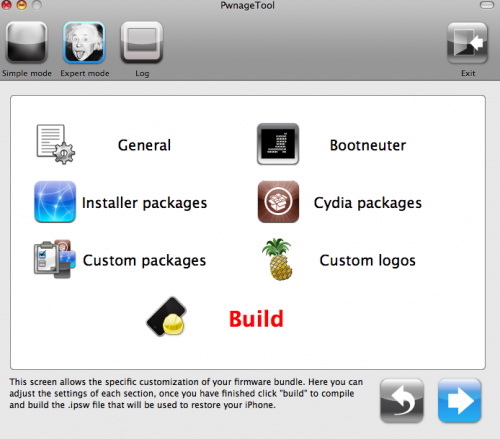
Now older IPhone users users can upgrade to firmware 2.0 and IPhone 3G users have a possibility to have jailbreaked IPhones. That is because PwnageTool 2.0 is released today. Download links are: mirror1, mirror2, mirror3.

Just a reminder: this tool jailbreaks and unlocks older iPhones, and jailbreaks iPhone 3Gs and iPod Touches. No unlock for Iphone 3G yet. The supported firmware is 2.0 only. Platform is Mac OS.

If you get Error 1600 from iTunes (or if you see in your log a failure to repare x12220000_4_Recovery.ipsw), try: mkdir “~/Library/iTunes/Device Support” ;  if that directory already exists, remove any files in it.  Then re-run PwnageTool.

Reminder: as of right now, there are no apps out for 2.0. Over the next few days some will come out. So do not update yet if you have some favorite 1.1.x apps you are using! 2.0 will not run 1.1.4 apps

UPDATE: version 2.0.1 is avaliable