Archive
Category: VideoA few hours ago iH8sn0w posted a tweet that he is able to run jailbreak on the new firmware 4.0 beta 1. DarkMalloc, another developer who worked on the project, has just released new video that shows firmware 4.0 jailbreak on iPhone 3G:
The interesting thing, besides the presence of Cydia and MobileTerminal, is the possibility to have multiple applications open at once. That means that multitasking on iPhone 3G can be enabled. Officially Apple doesn’t want to activate this functionality on iPhone 3G, just iPhone 3GS and later devices.
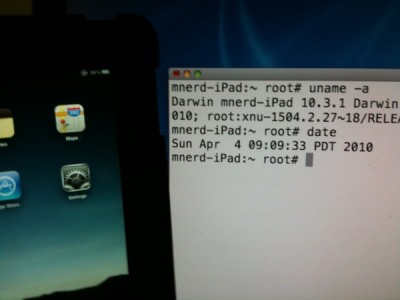
That didn’t take long. In less than 24 hours hackers managed to jailbreak Apple iPad, to get a root access to a file system. The first video of a jailbreaked iPad was recently published by Musclenerd, famous hacker from DevTeam. This was a team work of Musclenerd, chronicdevteam, comex and chpwn.
Watch the video:
Geohot, the famous iPhone hacker and the creator of different jailbreak and unlock utilities (purplera1n, blackra1n and blacksn0w), is now working on a new jailbreak utility. It will support untethered jailbreak for all devices with the latest bootrom and the latest firmware. This includes iPhone 3GS and iPod Touch 3G.
Here is what Geohot writes in his blog:
The jailbreak is all software based, and is as simple to use as blackra1n. It is completely untethered, works on all current tethered models(ipt2, 3gs, ipt3), and will probably work on iPad too.
Don’t ask about a release date. You won’t make it happen any sooner.
It is still unclear if he used one of the recent iPhone Safari hacks to gain control of the device or if this is something else.
Here is a teaser video:
A few hours ago we wrote about new group of hackers who claimed to have found a new exploit for the iPhone 3GS and iPod Touch with new iBoot. With this Gull1Hack utility you should be able to perform the untethered Jailbreak even on new devices. Here is a new demo video:
What do you think? Fake?

A new group of hackers claim they found a new exploit for the iPhone 3GS and iPod Touch with the new BootRom. This means that jailbreak for iPhone 3GS (late models) and iPod Touch 2G (MC) and iPod Touch 3G will be available.
We just found an amazing Exploit in the Boot-System of the 3GS with the new Bootrom! This Exploit works on ALL iPhone and iPod Touches!
The tool will be called Gull1hack. The operation is very simple and the code is sent when the device is in recovery mode, just like Blackra1n and Redsn0w do. This jailbreak tool has been neither confirmed by Geohot nor from the DevTeam. Many users think this is fake. We’ll see.
Here’s a video with Gull1hack in action:
Sn0wbreeze, the famous tool for Windows, will be released towards the end of this week. Sn0wbreeze is the software that will allow users to create custom firmwares to use for jailbreak and unlock. Now this functionality is available for Mac OS usera with PwnageTool.
We have seen a video from Verizon named iDon’t and an ansfer from iPhone fans – the video named iDon’t Care. Here’s a new one, called iCan. It describes what a jailbreaked iPhone can do:
Here is the list of apps for that:
- Can be customized: using Winterboard
- I can run applications simultaneously: thanks to Backgrounder and Kirikae
- I can always use the tethering: thanks to the tweaks available in Cydia
- I call with Skype on 3G network: using VoiceOver3G or 3GUnrestrictor
- Support an open development: with applications to be released via Cydia
Nice, isn’t it?
![sn0wbreeze1 Sn0wbreeze: PwnageTool for Windows [Video]](http://jailbreak-iphone.ru/wp-content/uploads/2009/10/sn0wbreeze1.jpg "sn0wbreeze")
With sn0wbreeze it will be possible to create custom firmware under Windows and use it for firmware 3.1 jailbreak. This is basically a port of PwnageTool for Windows. The developer of this tool, iH8sn0w, published a video:

The Chronic Dev Team is currently working on a new project called “GreenPois0n”. It will unlock and jailbreak the new iPod Touch 3G.
There is not much info on that, just a demonstration video uploaded to Qik:
via ispazio