Mobile | Jailbreak iPhone, iPod Touch, iPad - Part 3 Skip to content

Jailbreak iPhone, iPod Touch, iPad

новости про джейлбрейк iPhone, iPod Touch и iPad

Archive

Tag: mobile

iphone-hacker-

The founder of Jailbreakme.com Comex has said on Twitter that he is joining Apple as an intern. Site JailbreakMe.com greatly facilitates jailbreaking for users. He said about the hiring on Twitter:

“It’s been really, really fun, but it’s also been a while and I’ve been getting bored. So, the week after next I will be starting an internship with Apple”.
Read the rest of this entry »

pwnagetool413-3gs-3

UPDate: save your iOS 4.2.1 SHSH blobs now!

UPDate 2: Attention! We’ve received info, that Apple stopped signing iOS 4.2 for devices for which iOS 4.3 is available. This means you will not be able to restore to 4.2.1 without saved SHSH keys.

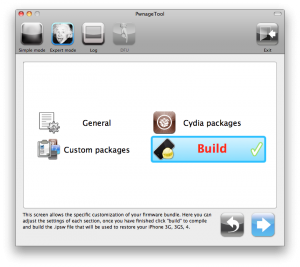
Using this tutorial you will be able to jailbreak iOS 4.2.1 running on iPhone 3G, iPhone 3GS, iPhone 4, iPod Touch 3G, iPod Touch 4G and iPad. Pwnagetool will also preserve baseband version if you need carrier unlock. If you have updated the baseband to version 06.15, you can use this tutorial. This tutorial uses PwnageTool 4.2 for Mac OS X.

We are not developers of jailbreak utilities, so we cannot assure that everything will work just fine. However we tried this tutorial on several devices and succeeded.

We will use iPhone 4 in our jailbreak tutorial. The process is the same for all devices.

Step One
Make a folder called “Pwnage” on the desktop. Download a couple of things:

Read the rest >>>

android market

This week Google has released a new version of its client app for Android Market, which will work on any smartphone running Android OS 1.6 or higher.

The company aims to facilitate the process of discovering new software and its purchase. That’s why new Android Market will have a Cover Flow-like style of app listings and include new categories like Widgets and Live Wallpapers, as currently the catalog is filled pretty much with these kinds of software. Besides that, app pages will now have more info and links to related content.

Read the rest of this entry »

jailbreak API

Apple has reportedly disabled its jailbreak detection API through iOS 4.2 software update. The API helped third-party mobile device management (MDM) applications to check for unauthorized modifications of system files. Apple’s jailbreak detection API provided MDM applications direct access to iOS system information and was able to ask the operating system directly if it had been jailbroken. Jailbreak exploits typically change a number of operating system files, and exploit one or another low-level OS features to let users directly load their own or third-party applications.


Read the rest of this entry »

MobileTerminal-iPhone4-04

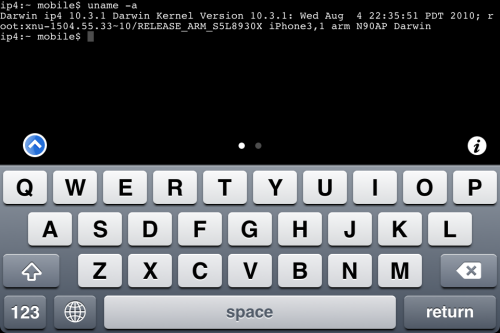
MobileTerminal is a terminal emulator application for the iPad and iPhone. The version of MobileTerminal that is available in Cydia doesn’t work with iPhone iOS 4.x. However there are beta versions that do work, but aren’t on Cydia because they are still in beta stages. This tutorial will show you step-by-step how to install MobileTerminal on iPhone with iOS 4.x (tutorial for iPad is here). If you have old version of MobileTerminal installed – uninstall it in Cydia (Search – MobileTerminal – Remove).

First of all you need to jailbreak your iPhone. If you have not done it already here is an easy tutorial: how to jailbreak iOS 4.0-4.1 on iPhone using Limera1n. After you successfully jailbreaked iPhone:

  1. Run Cydia by tapping on Cydia icon
  2. cydia_icon

  3. The Cydia will start:

Read the rest of this entry

MobileTerminal-iPad-05

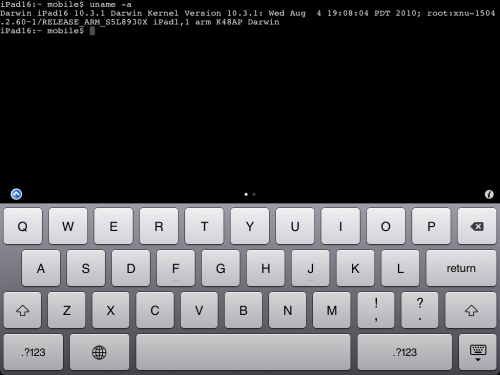
MobileTerminal is a terminal emulator application for the iPad and iPhone. The version of MobileTerminal that is available in Cydia doesn’t work with iPad iOS 3.2.2 and iPhone iOS 4.x. However there are beta versions that do work, but aren’t on Cydia because they are still in beta stages. This tutorial will show you step-by-step how to install MobileTerminal on iPad (tutorial for iPhone is here). If you have old version of MobileTerminal installed – uninstall it in Cydia (Search – MobileTerminal – Remove).

First of all you need to jailbreak your iPad. Here is an easy tutorial: how to jailbreak iPad with iOS 3.2.2 using Limera1n. After you successfully jailbreaked iPad:

  1. Run Cydia by tapping on Cydia icon
  2. cydia_icon

  3. The Cydia will start:

Read the rest of this entry

ios for ipad

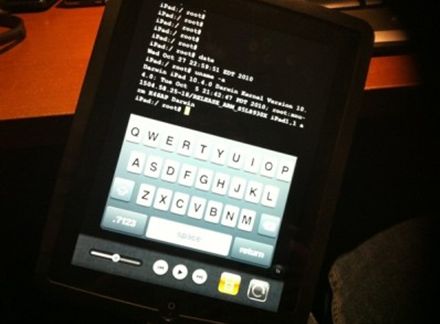
It seams that hackers have had their hands on the iOS 4.2 beta 3 for iPad. But, as we know, there is no official jailbreak for it. Recently the well-known iOS hacker posted aт interesting picture in Tweeter. The shot depicts an iPad running MobileTerminal, a jailbreak application, which gives users full access to the terminal command line interface. But it looks strange, because it means that the hackers missed the beta 4, which should be released this past Tuesday, according to the Apple’s schedule. This could signal that Apple may skip beta 4 altogether and go straight to a GM build sometime next week.

These are instructions on how to jailbreak your iPhone using PwnageTool 4.1 for Mac OS X. If you need unlock and you have not updated to iOS 4 you will be able to preserve baseband and unlock iPhone using ultrasn0w.

This guide will work for iPhone 4, iPhone 3GS, iPhone 3G, iPod Touch 3G, iPod Touch 4G, iPad and AppleTV. Just use the right firmware and select the right device (step four).

Step One
Make a folder called “Pwnage” on the desktop. Now you need to download there PwnageTool 4.1 from here and iOS 4.1 firmware from here.

When downloading the IPSW file, it is best to download it with Firefox since Safari often auto extracts it!

pwnagetool-41-1

Step Two
Double click to mount PwnageTool then drag the PwnageTool icon into the Pwnage folder.

Read the rest of this entry

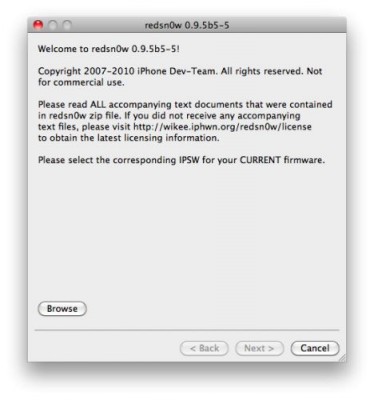
You cannot use JailBreakMe method to jailbreak and unlock iOS 4.0.2 on iPhone 3G. However you can still jailbreak and unlock iPhone 3G using redsn0w. Here are the instructions:

  • Download the latest RedSn0w 0.9.5-b5 in our utilities page here.
  • Download firmware images for iOS 4.0 here.
  • Run RedSn0w and point it at the 4.0 IPSW. (Yes – point it at the 4.0 IPSW even though you’re at 4.0.2). This will also hacktivate your iPhone3G at 4.0.1 if you haven’t already been activated by iTunes.
  • If you need a carrier unlock – install ultrasn0w in Cydia (add repository http://repo666.ultrasn0w.com). For T-Mobile in the USA remember to turn off 3G mode in Settings→General→Network.

Apple has released iOS 4.1 for the iPhone 3G, iPhone 3GS, iPhone 4, iPod Touch 2G, iPod Touch 3G and iPod touch 4G.

iOS 4.1 enables the Game Center social gaming network, support for High Dynamic Range (HDR) photos, and HD video uploading to YouTube. The update also fixes several bugs, including proximity sensor issues, performance issues and Bluetooth problems.

Full official changelog and download links are after the break:


Read the rest of this entry »