Here are our step-by-step tutorials that will guide you through all the process of tether jailbreaking iOS 6.0.1 with redsn0w and sn0wbreeze:

Tethered jailbreak iOS 6.0.1
Here are our step-by-step tutorials that will guide you through all the process of tether jailbreaking iOS 6.0.1 with redsn0w and sn0wbreeze:
Tethered jailbreak iOS 6.0.1
iH8Sn0w released Sn0wBreeze 2.9.7 that brings support for tethered jailbreak of iOS 6.0.1. New version supports iPhone 3GS, and iPod Touch 4G. It does not work with A5/A6 devices, like iPad 2, iPad 3, iPhone 4S, iPhone 5, etc.
Sn0wbreeze can be used to create a custom firmware with jailbreak and preserve iPhone modem (baseband) version for unlock.
You can find the release notes below. You can download the latest version of Sn0wBreeze from .
What is New?
● Added 6.0 (10A403)/6.0.1 (10A523) support. (Only includes iPhone 3GS & A4 devices).
● The 6.0/6.0.1 is currently a tethered based jailbreak via iBooty (except for iPhone 3GS old bootrom users).
● SAM is built-in for iOS 6 hacktivations. (Hacktivated phones can reboot to a semi-tethered state after being activated [rather than just hang at the Apple Logo]). Kudos @sbingner!Downgrading:
● Use iFaith mode after selecting/downloading the appropriate IPSW for your device. You will then be prompted to browse for SHSH blobs for the IPSW you have selected.
● Remember to enter a PWNED DFU state with sn0wbreeze’s iREB button in the top bar of sn0wbreeze prior to (SHIFT + Restoring) the custom signed IPSW!iREB & iOS 6:
Due to some changes in iOS 6, the current public standalone version of iREB will NOT enter a proper PWNED DFU state for restoring to custom iOS 6 IPSWs. An update for the standalone version should come sometime this week. In the meantime, use the iREB tab located in sn0wbreeze’s top status bar to enter a proper PWNED DFU state.A5(X)/A6(X) Support?:
As stated many times in the past, sn0wbreeze cannot be updated to work on A5(X)/A6(X) devices until a low level exploit in DFU or iBoot is found and made public.A5(X)/A6(X) Baseband Preservation/Hacktivation?
For those running A5(X)/A6(X) devices and need to preserve your baseband, there is nothing you can do at the moment. For those wanting to hacktivate, the only advice I can give is to buy the carrier’s SIM (the one its locked to obviously) on ebay. The SIM does not have to be active with the carrier to activate the phone.Known Bugs/Issues:
● Windows 8 users currently need to use workaround to run sn0wbreeze.
● iPad baseband will fail to flash on iOS 4.0 –> iOS 4.2.1 restores.
● iPod Touch 2G 4.x.x restores fail.
UPDATE: tutorials for iOS 6.0.1 jailbreak are available
Here are our step-by-step tutorials that will guide you through all the process of tether jailbreaking iOS 6 with redsn0w:
Tethered jailbreak iOS 6

(Un)Tethered jailbreak iOS 6
Tethered jailbreak iOS 6
Tutorials for iOS 5.1.1 can be found .
Tutorials for iOS 5.0.1 can be found .
Tutorials for iOS 5.1 can be found .
Other tutorials are available .
The iPhone Dev-Team has updated RedSn0w 0.9.15 with some bug fixes for iPhone 3GS and iPad owners.
Version 0.9.15b2 fixes a few issues for 3GS owners: old-bootrom awesomeness is no longer forgotten directly after a restore, and iPad baseband upgrade/downgrade support is fixed (same production date cutoffs apply!). If your 3GS is currently tethered at 6.0 even though you have an old bootrom, just re-run redsn0w’s Jailbreak step (no need to restore). Don’t forget you can add some pizzaz with your own boot logo or a nerdy verbose boot.
Redsn0w 0.9.15 gives us possibility to do iOS 6 jailbreak and different downgrade options.
You can download RedSn0w 0.9.15b2 .
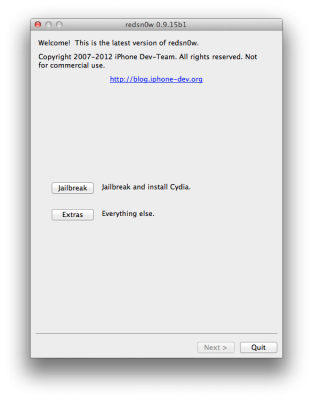
The iPhone Dev-Team has announced RedSn0w 0.9.15b1 which brings numerous new features including iOS 6 jailbreak for old devices, ability to restore to older firmware, manipulating SHSH blobs and etc.
iOS 6 jailbrak is tethered for , iPhone 3GS and iPod Touch 4G, untethered only for old iPhone 3GS with old bootrom. Tethered jailbreak means that each time you restart your device you will need to connect it to a computer and run redsn0w.
iPhone 4S, iPhone 5, iPad 2 and iPad 3 are not supported.
We will create our step-by-step tutorials soon.
You can download RedSn0w 0.9.15b1 .
The iPhone Dev-Team has released a tethered jailbreak of iOS 6 for the iPhone 3GS, , and iPod touch 4G.
Just like at the at the wind-down of last year’s WWDC, we’re releasing a developer-only version of a redsn0w tethered jailbreak for app developers.
Supported Devices:
You can download the latest version of RedSn0w from here:
DevTeam comments are available .
MuscleNerd has announced the successful jailbreak of his iPod touch 4G on iOS 6 Beta.
Here’s ioreg of my tethered-JB ipt4g 6.0: http://is.gd/1qOwvW ..MANY things including Cydia are broken, don’t expect beta JB for a while!
Here are our step-by-step tutorials that will guide you through all the process of untether jailbreaking iOS 5.1.1 with absinthe, redsn0w and sn0wbreeze:
UnTethered jailbreak iOS 5.1.1
UnTethered jailbreak iOS 5.1.1
The iPhone Dev-Team has released RedSn0w 0.9.12b2. New version has some bugfixes and additional question about jailbreak mode for A4 devices.
Redsn0w allows owners of A4+earlier devices to install rocky-racoon two different ways:
Redsn0w 0.9.12b2 will ask owners of iPhone 3GS, , iPod Touch 3G, iPod Touch 4G and iPad 1 what jailbreak mode they would like to use.
Starting with version 0.9.12b2, redsn0w will now explicitly ask users with limera1n-able devices whether they want to inject rocky-racoon using the DFU ramdisk method or the backup/restore method (the ramdisk method is better for those with lots of media on their device that would create very large backups, and it’s required for those with unactivated iPhones). If you’ll always want to use limera1n, you can select that in the Preferences pane. It also fixes an iBooks issue on old-bootrom 3GS iPhones, and provides more useful error messages when things go wrong.
RedSn0w 0.9.12b2 supports untethered iOS 5.1.1 jailbreak for all devices:
You can download RedSn0w 0.9.12b2 .
iOS 5.1.1 untethered jailbreak tutorial using Redsn0w is available .
iH8Sn0w released Sn0wBreeze 2.9.6. What’s new:
Sn0wbreeze can be used to create a custom firmware with jailbreak and preserve iPhone modem (baseband) version for unlock.
Sn0wbreeze 2.9.6 supports iPhone 3GS, , iPad 1, iPod Touch 3G, iPod Touch 4G and Apple TV 2G. It does not work with A5 devices, like iPad 2, iPad 3 and iPhone 4S.
You can download Sn0wBreeze 2.9.6 from .
Our step-by-step tutorials for Sn0wBreeze 2.9.6 are available here:
Tutorials for jailbreak using Absinthe 2.0 are .
You can find step-by-step instructions on how to jailbreak Apple TV 2G with Seas0nPass (Windows, Mac OS).


