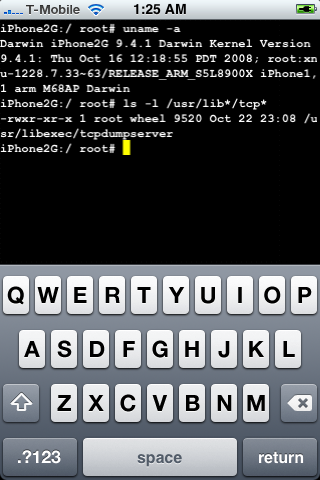
DevTeam posted a screenshot of jailbreaked and unlocked iPhone 2G with new firmware 2.2b2. This is cool that Apple still doesn’t have anything to prevent this.
Related post: Tutorial: How to perform Jailbreak, Activation and Unlock (Windows)
DevTeam posted a screenshot of jailbreaked and unlocked iPhone 2G with new firmware 2.2b2. This is cool that Apple still doesn’t have anything to prevent this.
Related post: Tutorial: How to perform Jailbreak, Activation and Unlock (Windows)
We had a post about SBSettings – the future of BossPrefs (link). Couple days ago this application became avaliable in Cydia.
![sbsettings 090 1 200x300 SBSettings [Cydia]](http://jailbreak-iphone.ru/wp-content/uploads/2008/10/sbsettings_090-1.png "sbsettings_090-1")
![sbsettings 090 2 200x300 SBSettings [Cydia]](http://jailbreak-iphone.ru/wp-content/uploads/2008/10/sbsettings_090-2.png "sbsettings_090-2")
SBSettings doenst have an icon so after you install to access it you must slide across the statusbar (aka the top bar that displays service, time, battery, etc.)
Current version is 0.92. But the application is updated almost every day.
This application is avaliable for jailbreaked iPhones via Cydia installer.
The developer, Kevin Rose, says this application will be avaliable officially via AppStore. No jailbreaking and hacking. The only concern.. will Apple approve it? I hope so. Watch the video:
PS: It will be free 
Related posts:
This application is developed by Jay Freeman, the creator of the Cydia. Veency is a free app that allows iPhone owners to remotely control their iPhone from PC or Mac desktop via a VNC client.
Here are some of the features:
Of course you cannot do two finger gestures with this app. All other actions can be done with the click of your mouse. The only area in which Veency fails tragically at is when opening any video recording application on the iPhone.
This application is avaliable for jailbreaked iPhones via Cydia installer.
Be sure to restart your iPhone after installing Veency and connect to the server using a Wi-Fi connection. We recommend using or to connect your Windows desktop. If you’re using a Mac, we recommend .
Here is a video demonstration:
via readwriteweb
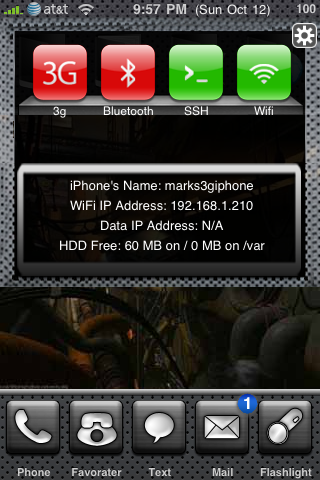
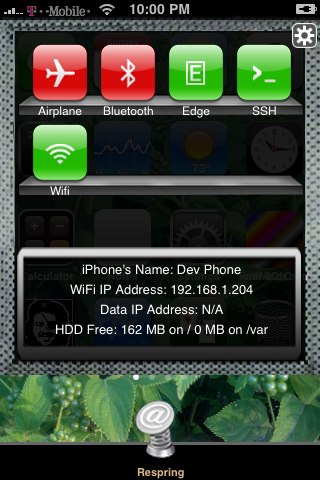
Many users of jailbreaked iPhones use application called BossPrefs. The developer of this app is creating a new one. The new application will be called SBSettings.
The toggles drop down when you swipe along the status bar. It is very fast and can be used while in any app without exiting the app. Suppose you are in Safari but realize your 3g is not yet enabled. Just swipe the statusbar and toggle 3g, than resume in Safari where you left off. The advantage is there is no need to exit Safari and load settings or bossprefs.
The look and feel of this new app will be something like this:
via thebigboss
This is a step-by-step tutorial. If you have iPhone 3G this guide will help you jailbreak and activate the device. For iPhone 2G it will also perform the unlock.
I recommend using 2.2 firmware, because iPhone 3G unlock is avaliable now. But you can use it with old v2.1, v2.0.1 and v2.0.2.
1. If you’re using old firmware and want to upgrade, please, do it via iTunes.
2. Go ahead and download QuickPwn 2.2 (download links).
3. Download firmware (download links).
4. Close iTunes (if opened) and start QuickPwn. You will see the following:
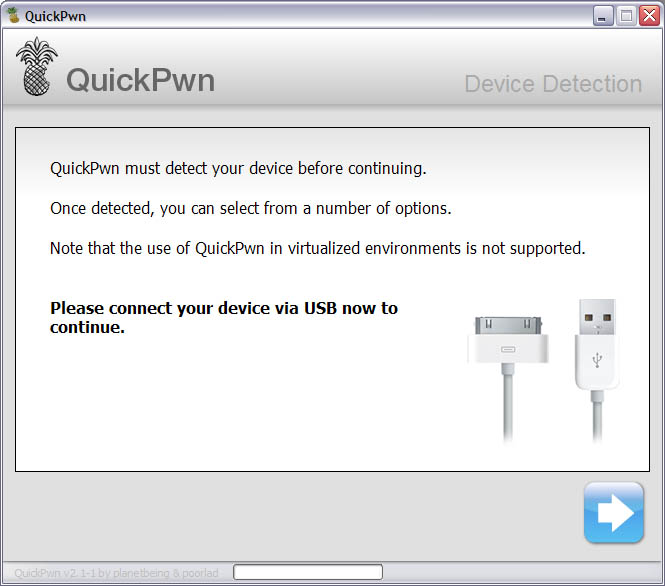
5. Connect you iPhone or iPhone 3G and push next button.
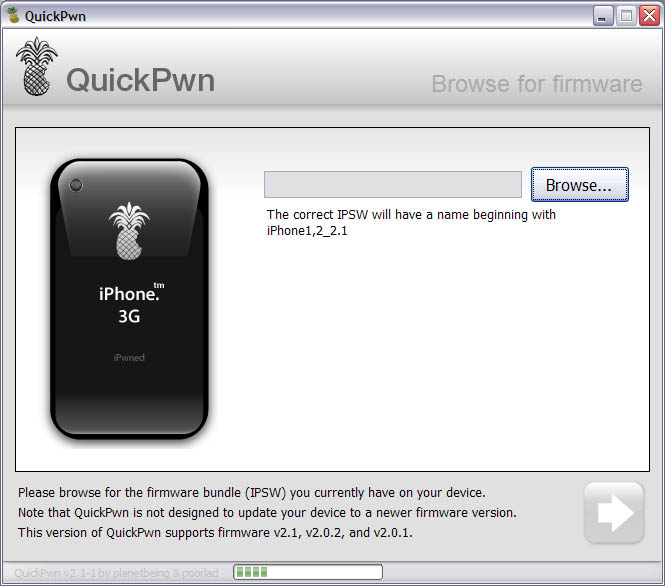
6. Your deveice is detected. Click browse to select firmware image.
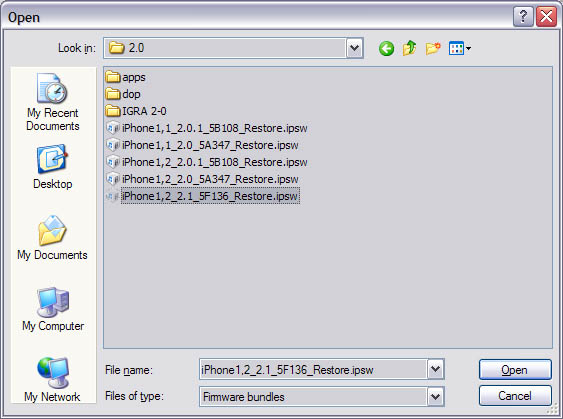
7. Select the image that you downloaded in step 3. Make sure this is the same version that you currently have on your iPhone. If you want to upgrade go to step 1.
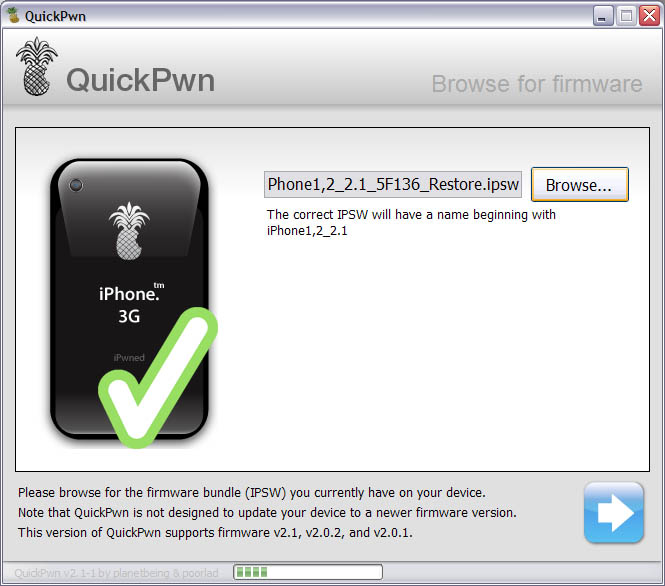
8. The application will verify that you choose the right version of firmware image. Click next.
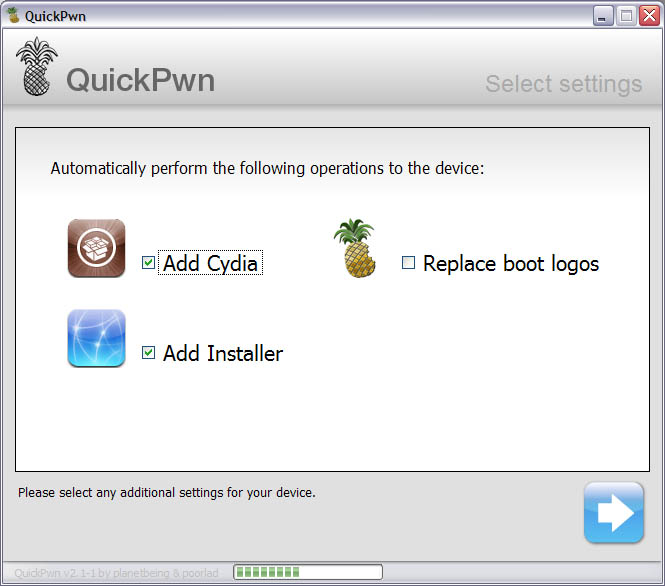
9. You will be frequently using Cyda, so make sure to check it. Installer is in beta, but it will be updated in the future, so check this one too. Click next.
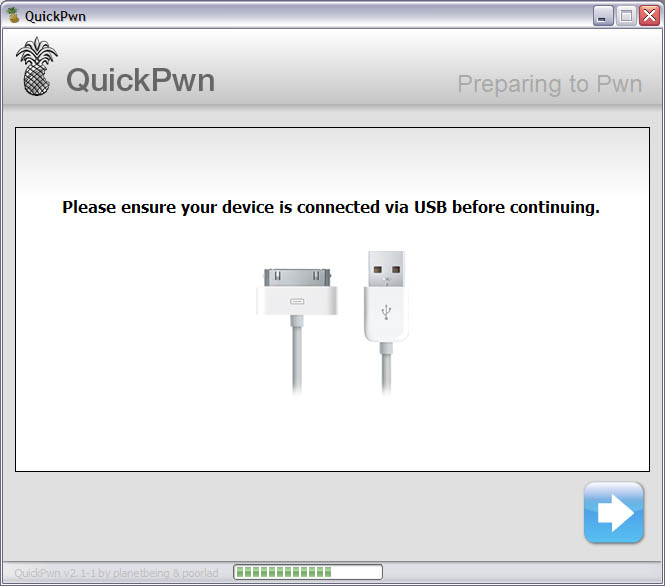
10. Check if your device is connected and hit next.
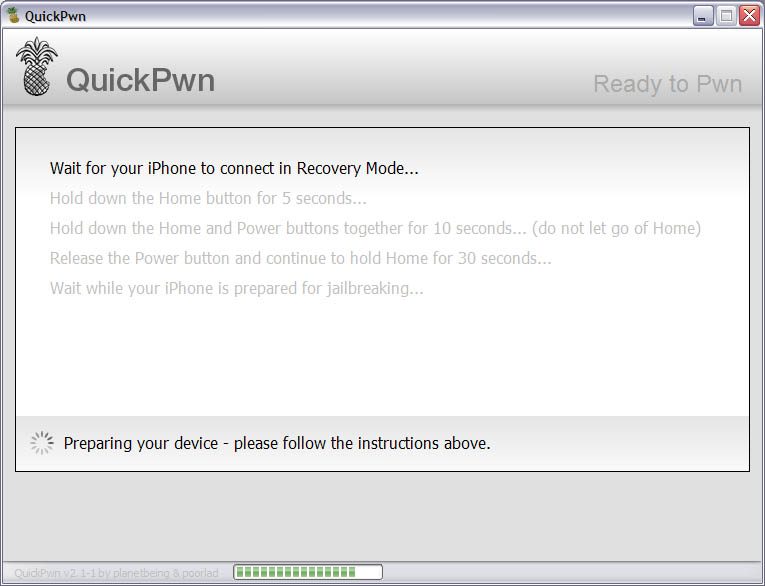
11. This is probably the hardest part. You will need to press Home and Power buttons on your iPhone in the special order. So make sure you read instructions carefully and follow them. If not, not big deal, you’ll be able to start from step 4.
There are 3 steps here: hold down Home button for 5 sec, than hold Home and Power button for 10 sec, than hold Home butting for 30 sec.
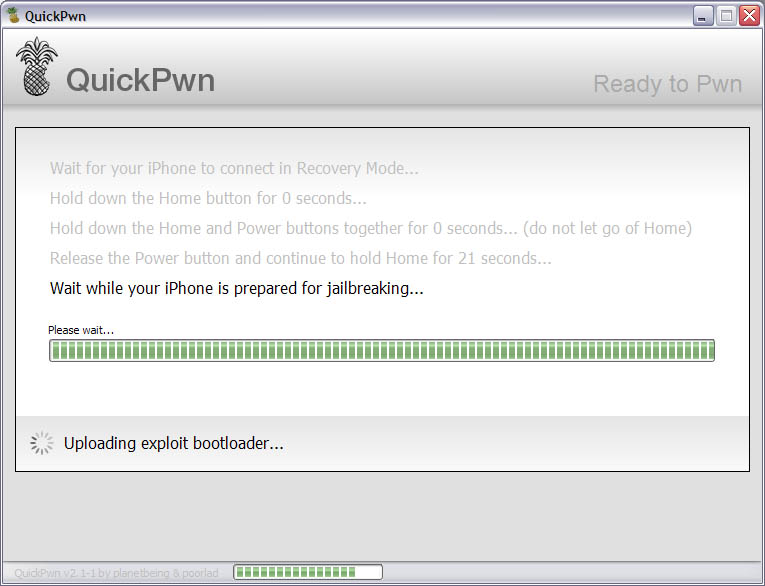
12. Than you’ll have to wait whilce QuickPwn will do the work.
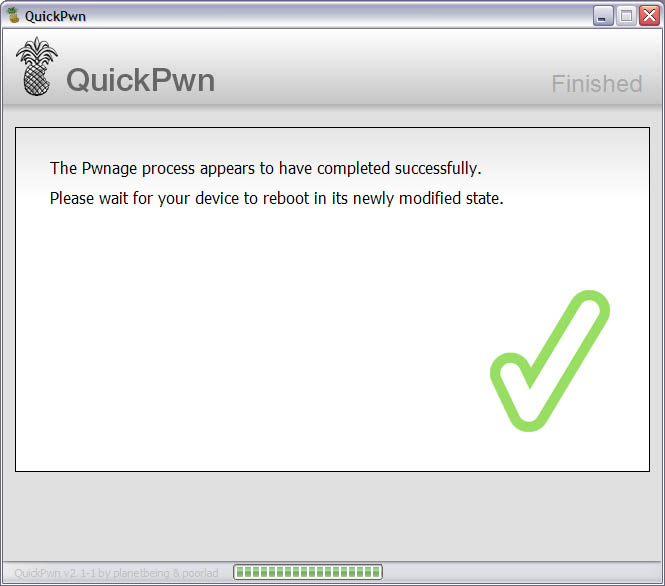
13. Congratulations! You did it. Now you can run Cydia Installer and install usefull and free applications.

Here are download links for the latest versions of software for iPhone, iPod Touch and iPad jailbreaking, activating and unlocking:
evasi0n | RedSn0w | Sn0wBreeze | PwnageTool | Absinthe |GreenPois0n | iReb | iBooty | iFaith | UltraSn0w | LimeRa1n | Spirit | BlackRa1n | BlackSn0w | PurpleRa1n
For iOS 4.0, iOS 4.0.1 and you can use
(untethered iOS 6.0 – iOS 6.1.2 jailbreak for all devices: iPhone 3GS, , iPhone 4S, iPhone 5, iPod Touch 4G, iPod Touch 5G, iPad 2, iPad 3, iPad 4, iPad mini)
(tethered iOS 6.1.3 jailbreak for iPhone 3GS, iPhone 4, iPod Touch 4G, untethered for old-bootrom iPhone 3GS; untethered for iOS 6.0 – iOS 6.1.2)
(untethered iOS 6.0 – iOS 6.1.2 jailbreak for all iPhone 3GS, iPhone 4, iPod Touch 4G)
(supports tethered jailbreak of iOS 6.0.1 for iPhone 4, iPhone 3GS, iPod Touch 4G)
(pwnagetool for windows, supports untethered jailbreak of iOS 5.1.1 for iPhone 4, iPhone 3GS, iPod Touch 3G, iPod Touch 4G, iPad and Apple TV 2G)
(pwnagetool for windows, supports tethered jailbreak of iOS 5.1 for iPhone 4, iPhone 3GS, iPod Touch 3G, iPod Touch 4G, iPad; untethered for iPhone 3GS with old bootrom; untethered for iOS 5.0.1, iOS 4, iOS 3 supports Apple TV 2G)
(pwnagetool for windows, supports untethered jailbreak iOS 5.0.1, iOS 4, iOS 3 for iPhone 4, iPhone 3GS, iPod Touch 3G, iPod Touch 4G, iPad)
(pwnagetool for windows, supports iOS 5, iOS 5.0.1, tethered jailbreak for iPhone 4, iPhone 3GS, iPod Touch 3G, iPod Touch 4G, iPad, Apple TV 2G; untethered for iPhone 3GS with old bootrom)
(pwnagetool for windows, supports iOS 4.3.3, untethered jailbreak for iPhone 4, iPhone 3GS, iPod Touch 3G, iPod Touch 4G, iPad, Apple TV 2G)
(pwnagetool for windows, supports iOS 4.2.1, jailbreak for iPhone 4, iPhone 3GS, iPhone 3G, iPod Touch 2G, iPod Touch 3G, iPod Touch 4G, iPad)
(tethered iOS 6 jailbreak for iPhone 3GS, iPhone 4, iPod Touch 4G; untethered for iPhone 3GS with old bootrom)
(downgrade 06.15 baseband to 05.13, get back GPS and iltrasn0w unlock for iPhone 3GS and iPhone 3GS)
(tethered iOS 6 jailbreak for iPhone 3GS, iPhone 4, iPod Touch 4G)
(untethered iOS 5.1.1 jailbreak for all devices: iPhone 3GS, iPhone 4, iPhone 4S, iPad 1, iPad 2, iPad 3, iPod Touch 3G, iPod Touch 4G)
(untethered iOS 5.1.1 jailbreak for all devices: iPhone 3GS, iPhone 4, iPhone 4S, iPad 1, iPad 2, iPad 3, iPod Touch 3G, iPod Touch 4G)
(tethered iOS 5.1.1, iOS 5.1 jailbreak for iPhone 3GS, iPhone 4, iPad 1, iPod Touch 3G, iPod Touch 4G; untethered iOS 5.0.1 jailbreak for all devices, including iPhone 4S, iPad 2; save unlock tickets)
(tethered iOS 5.1 jailbreak for iPhone 3GS, iPhone 4, iPad 1, iPod Touch 3G, iPod Touch 4G; untethered iOS 5.0.1 jailbreak for all devices, including iPhone 4S, iPad 2; save unlock tickets)
(tethered iOS 5.1 jailbreak for iPhone 3GS, iPhone 4, iPad 1, iPod Touch 3G, iPod Touch 4G; untethered iOS 5.0.1 jailbreak for all devices, including iPhone 4S, iPad 2)
(tethered iOS 5.1 jailbreak for iPhone 3GS, iPhone 4, iPad 1, iPod Touch 3G, iPod Touch 4G)
(untethered iOS 5.0.1 jailbreak for iPhone 3GS, iPhone 4, iPad 1, iPod Touch 3G, iPod Touch 4G)
(tethered iOS 5.0.1, iOS 5 and iOS 4.3.5 jailbreak for iPhone 3GS, iPhone 4, iPad, iPod Touch 3G, iPod Touch 4G; untethered for iPhone 3GS with old bootrom; supports untethered iOS 4.3.3 jailbreak)
(tethered iOS 5.0.1, iOS 5 and iOS 4.3.5 jailbreak for iPhone 3GS, iPhone 4, iPad, iPod Touch 3G, iPod Touch 4G; untethered for iPhone 3GS with old bootrom; supports untethered iOS 4.3.3 jailbreak)
(tethered iOS 5, iOS 4.3.5 jailbreak for iPhone 3GS, iPhone 4, iPad, iPod Touch 3G, iPod Touch 4G; untethered for iPhone 3GS with old bootrom; supports untethered iOS 4.3.3 jailbreak)
(supports untethered iOS 4.3.3 jailbreak for iPhone 3GS, iPhone 4, iPad, iPod Touch 3G, iPod Touch 4G)
(supports untethered iOS 4.3.3, tethered iOS 4.3.5, iOS 5 jailbreak for iPhone 3GS, iPhone 4, iPad, iPod Touch 3G, iPod Touch 4G; untethered for iPhone 3GS with old bootrom)
(untethered iOS 5.1.1 jailbreak for iPhone 3GS, iPhone 4, Apple TV 2G, iPad 1, iPod Touch 3G, iPod Touch 4G)
(supports untethered iOS 5.0.1 jailbreak for iPhone 3GS, iPhone 4, Apple TV 2G, iPad, iPod Touch 3G, iPod Touch 4G)
(supports untethered iOS 4.3.3 jailbreak for iPhone 3GS, iPhone 4, Apple TV 2G, iPad, iPod Touch 3G, iPod Touch 4G)
(Windows tool that will put your device into a pwned state so that you can upload custom firmware to it)
(Utility to Boot Tethered iPhone 4, iPhone 3GS, iPad, iPod Touch 3G, iPod Touch 4G after Sn0wBreeze jailbreak)
iFaith 1.4.2 (Windows tool that will save SHSH keys for your current installed iOS)
(supports untethered iOS 5.1.1 jailbreak for iPad 3, iPad 2, iPad 1, iPhone 4S, iPhone 4, iPhone 3GS, iPod Touch 3G, iPod Touch 4G)
(supports untethered iOS 5.0.1 jailbreak for iPad 2 and iOS 5/5.0.1 jailbreak for iPhone 4S)
(supports firmware 4.1 and 4.2.1 jailbreak for iPhone 4, iPhone 3GS, iPod Touch 2G, iPod Touch 3G, iPod Touch 4G, iPad)
Current version is ultrasn0w 1.2.3, download in Cydia (unlock for iPhone 4, iPhone 3GS, iPhone 3G, firmwares 3.0-4.3.3; it supports basebands 01.59.00, 04.26.08, 05.11.07, 05.12.01, 05.13.04, 06.15.00)
(supports firmware 4.0-4.1, jailbreak for iPhone 4, iPhone 3GS, iPod Touch 3G, iPod Touch 4G, iPad)
(jailbreak for all devices – iPad, iPhone, iPod Touch, firmware 3.1.2, 3.1.3, or 3.2)
(jailbreak for all devices, firmware 3.1.2)
(unlock for iPhone 3G and iPhone 3GS, firmware 3.1, 3.1.2)
(Beta jailbreak for iPhone 3GS, firmware 3.0)
(Beta jailbreak for iPhone 3GS, firmware 3.0)
You can download older software versions .absinthe-mac-0.1.2-2.zip

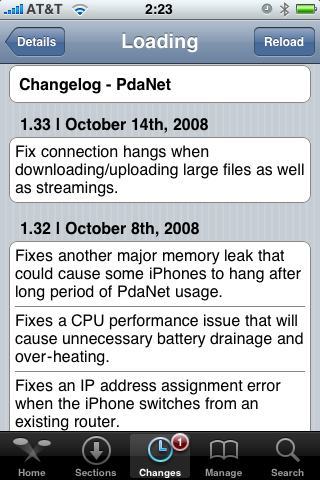
PdaNet updated to version 1.33. This tool allows you to connect any desktop or notebook to internet through iPhone 3G. Here is a changelog:
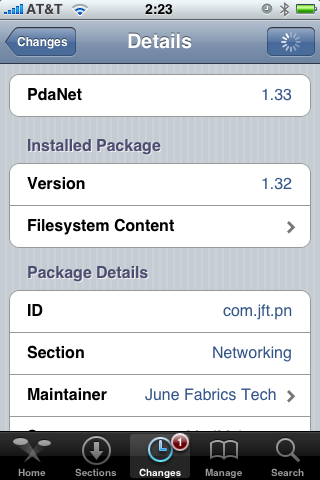
This application is avaliable via Cydia Installer for jailbreaked iPhones.